
Fill the cutting system with coolant
Use the correct amount and type of coolant mixture to help prevent damage to the cutting system.
| Notice | |
|---|---|
LOW COOLANT LEVELS CAN DAMAGE THE CUTTING SYSTEM AND COOLANT
PUMP
There is a risk of serious damage to the cutting system and to the
coolant pump if you operate the cutting system with no coolant or with low
coolant. If your coolant pump is damaged, pump replacement can be
necessary.
Never operate the cutting system if you get a low coolant level
notice.
| |
| Notice | |
|---|---|
AUTOMOTIVE ANTIFREEZE CAN DAMAGE THE TORCH COOLANT
SYSTEM
Antifreeze contains chemicals that can damage the torch coolant
system.
Never use automotive antifreeze in place of Hypertherm
coolant.
| |
| Notice | |
|---|---|
USE THE CORRECT COOLANT
If you use an incorrect coolant, it can cause damage to the cutting
system.
Refer to the coolant requirement specifications for your plasma cutting
system.
| |
- Calculate the correct percentage of propylene glycol to add in the premixed Hypertherm® coolant (028872).
- Refer to Coolant requirements.
- Make sure that you have the correct coolant mixture for your cutting system.
-
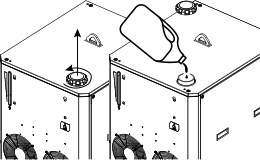
Remove the
cap
from the reservoir fill port inlet on top of the
cooler.
-
Look at the coolant-level view window to see if the reservoir is full.
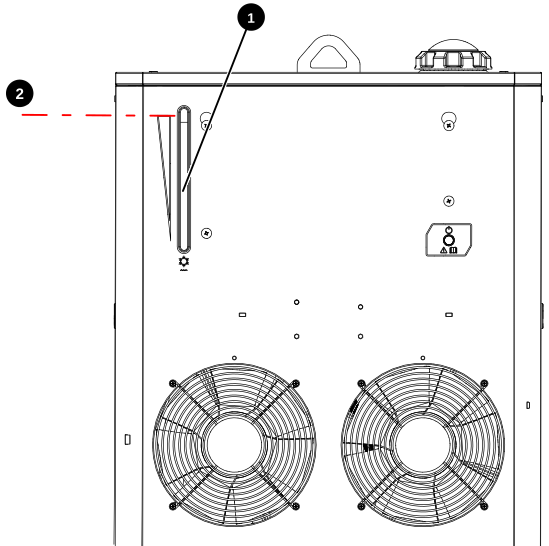
1 Coolant-level view window 2 Maximum fill line -
Add the coolant in the reservoir until the coolant is at the recommended fill
level.
You can see the coolant level from the view window on the front of the cooler as you add the coolant.
CAUTION WET FLOORIf you put too much coolant in the reservoir, the coolant can go through an overflow tube and come out at the bottom of the cooler. Coolant can cause floors to become slippery.Be careful not to put too much coolant in the reservoir. -
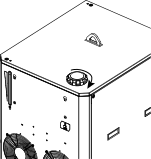
Install the
cap
onto the coolant reservoir.
-
Supply power to the cutting system:
- Set the line-disconnect switch to the ON position.
- Make sure that the remote on-off switch is in the ON position.
-
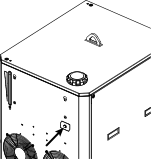
Make sure that the green power-indicator Light Emitting Diode (LED) is illuminated on the cooler.
-
Use the Computer Numerical Control (CNC) or XPR® web interface to send a process to the plasma power
supply and start the coolant pump.
- When you send a process, the gases start to flow, and after a few seconds the coolant pump starts.
- If the pump stops, it is necessary to purge the air out of the coolant loop.
- Use the remote on-off switch to start and stop the coolant pump until the pump continues to run.
- If necessary, add more coolant to fill the reservoir to the recommended fill level.
After you add the coolant, use the CNC or XPR web interface to clear the process.
