
Remove old coolant from the plasma cutting system
Empty the reservoir, heat exchanger, hoses, and filter housing. Use compressed air to remove remaining coolant. Replace the coolant filter and pump screen if necessary. Clean all parts and look for debris before you connect the hoses.
- Remove the power from the cutting system.
- Get a new coolant-pump filter and find the provided drainage tube.
- Get an empty container that holds the approximate total coolant volume for your cutting system. Refer to Make an estimate of the total coolant volume.
-
Remove the correct external panel to get access to the coolant system.
- For the XPR170® and XPR300®, the correct external panel is on the right when you look at the front of the plasma power supply.
- For the XPR460®, the correct external panel is on the left when you look at the rear of the cooler.
-
Remove the old coolant from the coolant reservoir:
- Connect the provided drainage tube (10083915) to the drainage fitting on the bottom of the coolant reservoir
- Keep the cap on the coolant reservoir inlet to slow coolant flowing for temporarily.
- Put the other end of the drainage tube in an empty container that holds the approximate total coolant volume for your cutting system.
- Move the valve for the drainage fitting to the open position.
- Remove the cap from the coolant reservoir inlet to let coolant start flowing.
-
Remove the old coolant from the heat exchanger:
- Keep one end of the drainage tube connected to the drainage fitting and the other end of the drainage tube in the container.
-
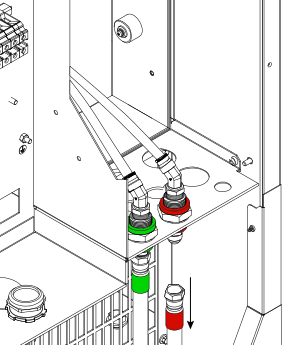
Remove the correct coolant-return hose (red band) from the correct coolant-return
fitting.
- For the XPR170 and XPR300, the correct coolant-return hose (red band) is connected to
the coolant-return fitting (red) on the rear of the plasma power
supply.
Figure 1. XPR170 and XPR300 coolant-return hose - For the XPR460, the correct coolant-return hose
(red band) is connected to the coolant-return fitting (large red) on the rear
of the cooler.
Figure 2. XPR460 coolant-return hose
- For the XPR170 and XPR300, the correct coolant-return hose (red band) is connected to
the coolant-return fitting (red) on the rear of the plasma power
supply.
- Connect compressed air (no more than 6.89 bar/100 psi) to the coolant-return fitting (red, large red).
-
For no more than 30 seconds, use compressed air to blow the coolant in the
direction of the coolant reservoir and filter housing.
System components require coolant to lubricate rotating surfaces. If air flows for more than 30 seconds, it can remove too much coolant and have a bad effect on lubrication.
- Keep the coolant-return hose (red band) disconnected temporarily.
-
Remove the old coolant from the coolant pump:
- Put an empty container under the coolant-pump plug.
-
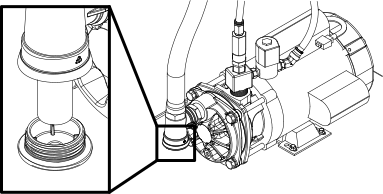
Remove the plug and screen from the coolant pump.
-
Clean and examine the coolant-pump screen and the O-ring on the coolant-pump
plug:
- Remove debris from the screen and use clean water to remove small particles if necessary.
- Examine the screen for damage.
-
Replace the screen (127559) if you find damage.
Install again the original screen if no damage is found.
- Use a clean cloth to wipe the O-ring on the coolant-pump plug and examine the O-ring for damage.
-
Replace the plug (428973) if you find O-ring damage.
Install the original plug with provided O-ring if no O-ring damage is found.
- Install the coolant-pump plug on the coolant-pump housing.
-
Remove the old coolant from the coolant-filter housing and replace the coolant
filter:
-
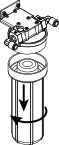
Remove the filter housing.
-
Discard all coolant from the filter housing and remove and discard the coolant
filter.
Recycle if possible. Discard if not.
- Examine the internal surfaces of the coolant-filter housing for debris.
- Remove debris from the internal surfaces and use clean water to remove small particles if necessary.
- Install a new coolant-pump filter (027005) in the pump housing.
- Install the filter housing.
-
Remove the filter housing.
-
Remove the old coolant from the coolant-supply and the coolant-return hoses:
The hoses can hold a large volume of coolant.
If you do not remove all of the old coolant from the hoses, the old and new coolant will mix. Mixing the old and new coolant causes contamination that will have a bad effect on coolant condition.
- Put the disconnected end of the coolant-return hose (red band) in an empty container that holds the approximate total coolant volume for your cutting system.
-
Remove the correct coolant-supply hose (green band) from the correct coolant-supply
fitting.
- For the XPR170 and XPR300, the correct coolant-supply hose (green band) is connected to the coolant-supply fitting (green) on the rear of the plasma power supply.
- For the XPR460, the correct coolant-supply hose (green band) is connected to the coolant-supply fitting (large green) on the rear of the cooler.
- Connect compressed air (no more than 6.89 bar/100 psi) to the disconnected end of the coolant-supply hose (green band).
- For approximately three minutes, blow compressed air in the coolant-supply hose (green band).
- Continue to blow compressed air in the coolant-supply hose (green band) until coolant stops flowing out of the coolant-return hose (red band).
-
After coolant stops flowing out of the coolant-return hose (red band), do one of the
following:
Option Description For the XPR170 and XPR300 Continue to the next step. For the XPR460 Remove the other coolant-supply hose (green band) and coolant-return hose (red band). Put the disconnected end of the coolant-return hose (red band) in the empty container. Do step 7.c, step 7.d, step 7.e again until coolant stops flowing out of the coolant-return hose (red band). -
Connect the correct coolant-return hose (red band) and coolant-supply hose (green band)
to the correct fittings.
- For the XPR170 and XPR300, the coolant-return hose (red band) is connected to the coolant-return fitting (red) and the coolant-supply hose (green band) is connected to the coolant-supply fitting (green) on the rear of the plasma power supply.
- For the XPR460, connect both of the
coolant-return hoses (red band) to the coolant-return fittings (red, large red) and both
of the coolant-supply hoses (green band) to the coolant-supply fittings (green, large
green) on the rear of the cooler.
Figure 3. Coolant connectors on the rear of the cooler 1 Coolant supply to the gas connect console (large green) 2 Coolant return from the gas connect console (large red) 3 Coolant supply to the plasma power supply (green) 4 Coolant return from the plasma power supply (red)
Install new coolant.
Refer to Fill the cutting system with coolant in the instruction manual that came with your cutting system.
