
Do a gas test
Use a gas test to see if sufficient gas pressure is exiting the torch. The gas test lets you see the plasma power supply’s actual gas pressure so that you can compare it to the inlet set pressure.
| CAUTION | |
|---|---|
 | |
-
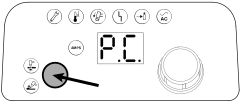
Press-and-hold the Mode button for approximately 5 seconds.
-
Release the Mode button when the 2-digit display shows
P.C.
P.C. indicates pressure check.
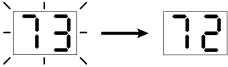
- The set pressure flashes on the 2-digit display before the actual output gas pressure shows.
- Make note of the set pressure so that you can compare it to the actual pressure.
 Note:
Note:If the 2-digit display shows "0.0" (bar) or "00" (psi) when you enter gas test mode, the torch is not in a "ready to fire" state. In this case, pull the trigger. The system then emits the warning puffs of air and displays the actual pressure.
During a gas test:
- Air flows continuously from the torch tip.
- The 2-digit display shows the output gas pressure.
- The AMPS Light Emitting Diode (LED) stays off.
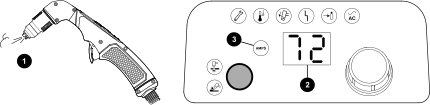
| 1 | Air from the torch tip |
|---|---|
| 2 | Two-digit display |
| 3 | AMPS LED |