
Connect to the plasma power supply with EtherCAT
- Connect the EtherCAT® cables to the plasma power supply and to the Computer Numerical Control (CNC) as shown.
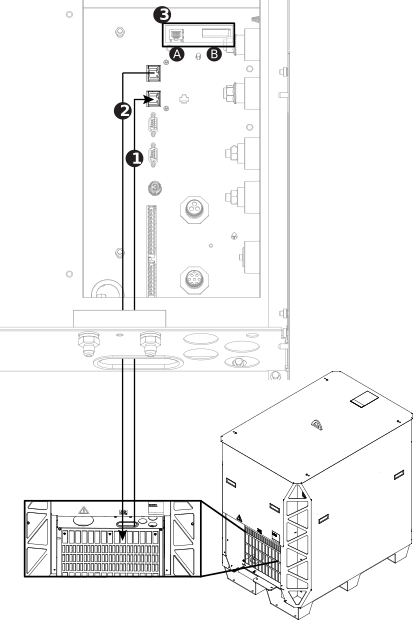
| 1 | EtherCAT in from the CNC.1 | |
|---|---|---|
| 2 | EtherCAT out to the next plasma power supply, if necessary.1 | |
| 3A | Ethernet LAN port: For future applications. Do not use. | |
| 3B | Expansion Printed Circuit Board (PCB) connectors: Necessary for redundant remote on-off feature, alternate 24 VDC power input, and analog estimated arc voltage output. | |
1 Refer to the label on the
rear of your plasma power supply. | ||