
Examine the coolant condition and level
Examine the coolant condition and level in the plasma cutting system. Replace the coolant if you find copper pieces or debris or if the coolant is clear and not the original pink color. Add coolant if the level is low.
- For the XPR170® and XPR300®, the location of the coolant reservoir is in the plasma power supply.
- For the XPR460®, the location of the coolant reservoir is in the cooler.
-
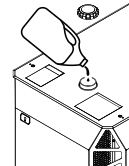
If the coolant level is low, add coolant (028872) until the coolant is at the recommended fill
level.
- For the XPR170 and XPR300, if the coolant is below the base of the inlet spout, add coolant to the
reservoir until the
coolant is
at
the base of the inlet spout.
- For the XPR460, if the coolant is below the maximum fill
line on the coolant-level view window on the cooler, add coolant to the reservoir until the coolant
level is
at
the maximum fill line.
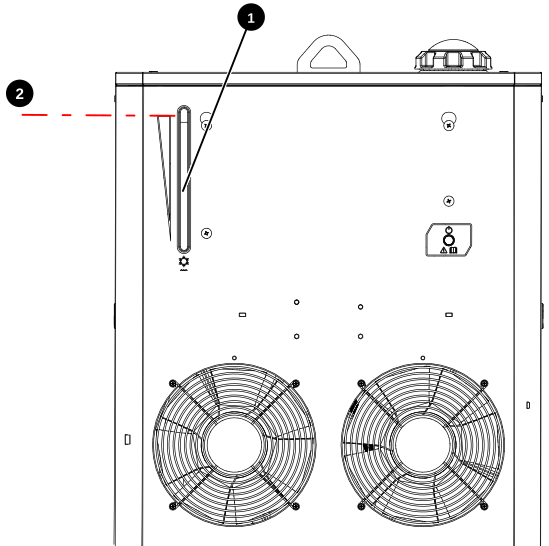
1 Coolant-level view window 2 Maximum fill line
CAUTION 
- For the XPR170 and XPR300, if the coolant is below the base of the inlet spout, add coolant to the
reservoir until the
coolant is
at
the base of the inlet spout.