System settings

Setting Description Defaults
Image of the seven segment display for the pressure settings. Change the gas pressure display values from psi (P) to bar (B) or from bar to psi.

CSA models – psi by default.

CE/CCC models – bar by default.

Image of the seven segment display for the motion and start indication.

Enable or disable motion and start indicator (shown by the service LED on the plasma power supply front panel).

  • L.0 – disabled. No service LED
  • L.1 – TRANSFER signal enabled. When the TRANSFER signal is received by the plasma power supply, the service LED illuminates
  • L.2 – START signal enabled. When the START signal is received by the plasma power supply, the service LED illuminates
Disabled.
Image of the seven segment display for the firmware version. Displays firmware version: F.0 through F.9. Unit specific.
Image of the seven segment display for switching modes.

Choose between smart mode, torch mode, and basic mode.

In smart mode, the plasma power supply automatically sets the operating mode, gas pressure, and amperage based on the type of Hypertherm® cartridge installed. Refer to Smart mode versus basic mode for details.
  • t.0 Smart mode. This is the default setting.
  • t.1 Torch mode (reserved for future use)
  • t.2 Basic mode
Smart mode.
Image of the seven segment display for the parity settings.
Computer Numerical Control (CNC) parity setting
  • C.E – even
  • C.0 – odd
  • Cn – no parity
Even parity bit.
Image of the seven segment display for the number of stop bits. CNC - number of stop bits per byte.
  • 5.1 – one stop bit
  • 5.2 – two stop bits
One stop bit
Image of the seven segment display for the address bits. CNC address bits
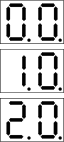
  • 0.0 – CNC address, third digit. Change the hundreds place value from 0 to 2. 0.0 = 0xx, 0.1 = 1xx, 0.2 = 2xx.
  • 1.0 – CNC address second digit. Change the tens place value from 0 to 9. For example, 1.3 = x3x, 1.4 = x4x, 1.5 = x5x,.
  • 2.0 – CNC address first digit. Change the ones place value from 0 to 9. For example, 2.6 = xx6, 2.7 = xx7, 2.8 = xx8.
0.0 – Zero in the hundreds place

1.0 – Zero in the tens place.

2.0 – Zero in the ones place.

Example — CNC node address set to 245:
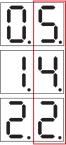
Image of the seven segment display for the transmit and receive time delay. Change the time delay between receive and transmit (Rx and Tx) actions.
This applies to half-duplex serial communications where the same wires are used for receiving and transmitting data.
  • d.0 – 0ms
  • d.1 – 10ms
  • d.2 – 50ms
No delay (d.0).
Image of the seven segment display for the under pressure lockout warning.

Show or hide the under pressure lockout warning (UPLO) fault code (0-20-0).

When disabled, the plasma power supply will not display the UPLO (0-20-0) warning when the air supply goes below the safe minimum operating pressure.
  • P.0 – enable under pressure lockout warning
  • P.1 – disable under pressure lockout warning
Enabled
Image of the seven segment display for the duty cycle lamp. Enable or disable the duty cycle clamp.
  • H.0 – enabled
  • H.1 – disabled
Enabled
Image of the seven segment display for factory reset.

Reset all settings to factory defaults.

  • r.0 – Do not reset.
  • r.1 – Reset.
Image of the seven segment display for the under pressure lockout warning. Exit the settings menu.