
Replace the air filter bowl and filter element

It is extremely important to keep a clean gas line in the plasma power supply.

  1. Set the power switch to OFF (O), disconnect the power cord from the power source, and disconnect the gas supply.
  2. Remove the air filter bowl by unscrewing the metal guard until it disconnects from the air filter assembly inside the plasma power supply.
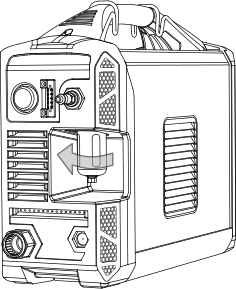
    The image shows the air filter being twisted.
  3. Remove the air filter bowl from the metal guard.
  4. Gently pry the filter element out of the filter bowl.

    Be careful not to damage the O-ring at the top of the bowl.

    The image shows a disassembled air filter bowl.
  5. Twist the plastic fittings until they come apart, approximately a 1/4 turn.

    Set the fittings aside.
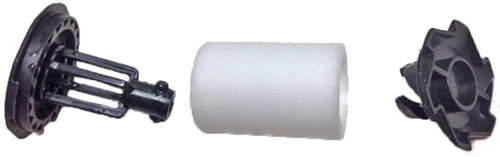
    The image shows the air filter removed from the two plastic fittings.
  6. Put the new air filter element in the plastic fittings.

    Twist the plastic fittings until they lock together, approximately a 1/4 turn.
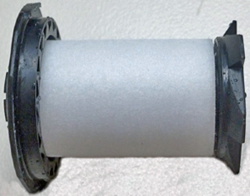
    The image shows a new air filter surrounded by the plastic fittings.
  7. Clean the air filter bowl by wiping away any oil, dirt, or other contaminants.
    Note:

    A yellow residue on the filter bowl can be a sign that oil is getting into the gas supply line.

  8. Examine the O-ring, and replace it if it has cracks or other damage.
  9. Put the O-ring at the top of the filter bowl.
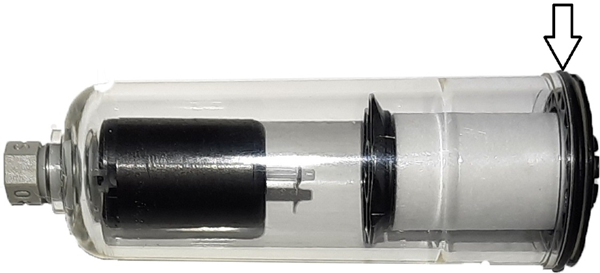
    Air filter bowl with O-ring called out.
  10. Put the filter element inside the air filter bowl.

    Push down on the top plastic fitting until you hear a click.

  11. Put the air filter bowl inside the metal guard.
  12. Put the air filter bowl back into place by screwing the metal guard into the air filter assembly that is inside the plasma power supply.

    Keep the metal guard straight so that you do not damage the threads as you install it.
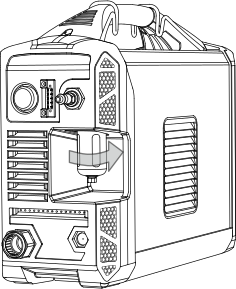
    The image shows the air filter screwed back on the plasma power supply.
  13. Reconnect the gas supply.
  14. Reconnect the power cord.
  15. Set the power switch to ON (I).