
Install the power switch (3-phase)
-
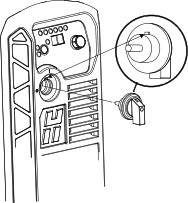
Align the tab on the knob with the notch on the front panel.
Secure the knob to the front panel using the plastic nut. Tighten to 2.3 N∙m (20 lbf·in).
-
Connect the wires to the power switch assembly.
Tighten to 2.3 N∙m (20 lbf·in).
Figure 1. 3-phase power switch wiring 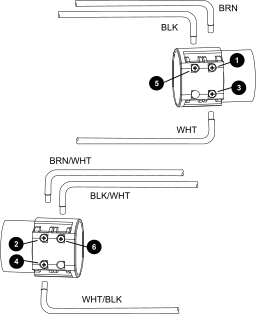
1 Brown (BRN) to contact 1. 2 Brown wire with white stripe (BRN/WHT) to contact 2. 3 Solid white wire (WHT) to contact 3. 4 White wire with black stripe (WHT/BLK) to contact 4. 5 Black (BLK) to contact 5. 6 Black wire with white stripe (BLK/WHT) to contact 6.