
Loosen the front panel

Some repairs only require you to loosen the front panel from the plasma power supply. Other repairs require that you remove the front panel from the plasma power supply. To completely remove the front panel, refer to Remove the front panel.

  1. Set the power switch to OFF (O), disconnect the power cord from the power source, and disconnect the gas supply.
  2. Disconnect the torch and the work lead from the front panel.
  3. Remove the plasma power supply cover and handle.
  4. Use a T15 TORX® driver to remove the screw at the bottom center of the panel.
  5. Use a blade screwdriver to push in the 2 tabs at the bottom of the panel until the panel detaches from the base.
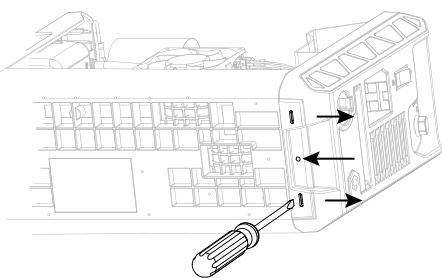
    The image shows where the 2 tabs are at the bottom of the power supply.
  6. Pull the front panel slightly away from the unit.