Jump to main content
Remove the power switch (1-phase)
-
Complete the following procedures:
-
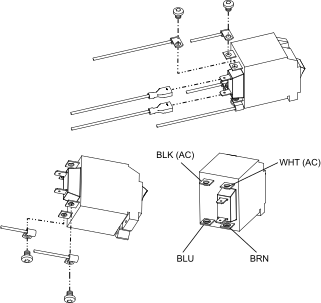
Remove the 2 screws that attach the switch to the front panel.
-
Remove the 2 quick-connect terminals from the back of the power switch.
-
Remove the black (BLK) and white (WHT) Alternating Current (AC) input wires from the screw terminals near the top of the switch.
-
Remove the blue (BLU) and brown (BRN) power wires from the screw terminals near
the base of the switch.
Figure 1. 1-phase power switch wiring