
Install the power switch (1-phase)
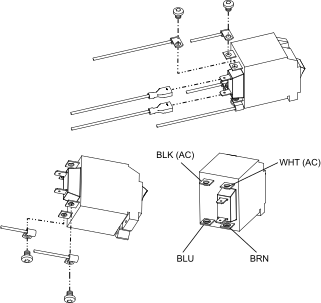
-
Connect the blue (BLU) and brown (BRN) wires from the power cord (CSA models)
or Electromagnetic Interference (EMI)
Printed Circuit Board (PCB) (CE/CCC models) to the bottom screw terminal
posts on the new power switch assembly.
Tighten to 2.3 N∙m (20 lbf·in).
-
Connect the black (BLK) and white (WHT) Alternating Current (AC) input wires from the main power PCB to the
appropriate screw terminal post on the power switch assembly.
Tighten to 2.3 N∙m (20 lbf·in).
- Plug the 2 quick-connect terminals onto the tabs on the power switch assembly.
-
Position the switch assembly against the front panel so that the I is
at the top and the O is at the bottom.
Secure with 2 screws. Tighten to 1.1 N∙m (10 lbf·in).
- Set the power switch to the OFF (O) position.
-
Complete the following procedures:
- Attach the front panel.
- Install the plasma power supply cover and handle.
- Reconnect the gas supply.
- Reconnect the power cord.