Remove the torch quick-disconnect receptacle
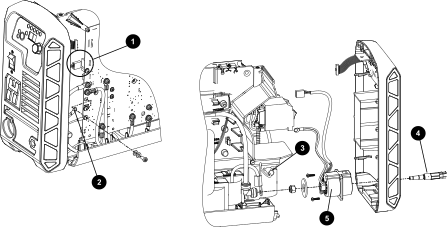
The image shows an exploded focused on the quick-disconnect components.
1 Power board J19 connection
2 Red wire pair (J15 connection)
3 Center panel slot
4 Brass torch fitting
5 Torch quick-disconnect receptacle
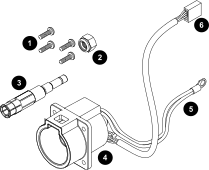
Detail view of individual components.
1 Screws
2 Nylon lock nut
3 Brass torch fitting
4 Torch quick-disconnect receptacle
5 Red wire pair (J15 connection)
6 Power Printed Circuit Board (PCB) J19 connection
  1. Complete the following procedures:
    1. Set the power switch to OFF (O), disconnect the power cord from the power source, and disconnect the gas supply.
    2. Remove the plasma power supply cover and handle.
    3. Remove the component barrier.
    4. Loosen the front panel.
  2. Unplug the connector from J19 on the power board PCB.
  3. Remove the screw from the RED connection point (J15) on the power PCB.

    This is the red wire pair from the torch quick-disconnect receptacle.

  4. Pull the red wire pair through the braided fiberglass sleeve and the pass-through slot in the center panel.
  5. Push the brass torch fitting out through the torch quick-disconnect receptacle.
  6. Separate the torch quick-disconnect receptacle from the front panel.