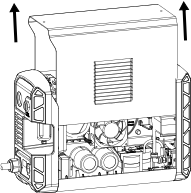
Remove the plasma power supply cover and handle

  1. Set the power switch to OFF (O), disconnect the power cord from the power source, and disconnect the gas supply.
  2. Remove the 2 screws from the plasma power supply handle.

    You may need to gently pull up on the handle to remove the screws.

  3. Remove the 2 screws from the bottom of the front and rear panels.
  4. Gently tilt the tops of the front and rear panels away from the unit to pull the handle out.
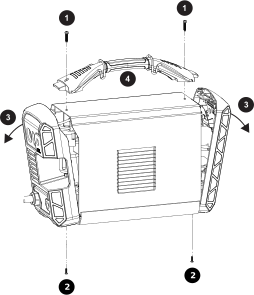
    The image shows the first four steps to remove the cover.
  5. Slide the cover off.
    Image that shows to slide the cover up off the power supply.