
Remove the display PCB and ribbon cable
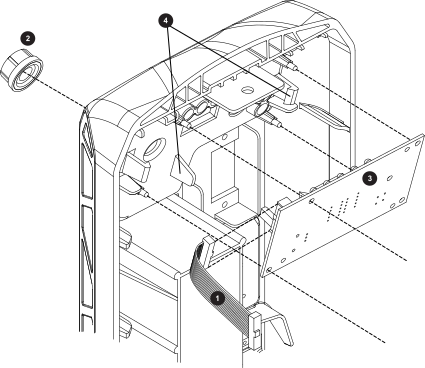
| 1 | Ribbon cable |
|---|---|
| 2 | Control knob |
| 3 | Kit: 528139 Display Printed Circuit Board (PCB) |
| 4 | PCB clips |
-
Complete the following procedures:
- Set the power switch to OFF (O), disconnect the power cord from the power source, and disconnect the gas supply.
- Remove the plasma power supply cover and handle.
- Loosen the front panel.
- Make sure the ribbon cable is disconnected from the power PCB.
- Pull the adjustment knob off the front panel.
- Disconnect the ribbon cable from the display PCB.
- Pull back the plastic clips, and slide the display PCB out of the front panel until it is clear of the 4 mounting posts.