
Remove the bulk capacitors
| Warning | |
|---|---|
ELECTRIC SHOCK CAN
KILL
Let the system release internal
voltages before you touch the capacitors. The
capacitors can hold a charge for several minutes
after the system is set to OFF.
| |
-
Complete the following procedures:
- Set the power switch to OFF (O), disconnect the power cord from the power source, and disconnect the gas supply.
- Remove the plasma power supply cover and handle.
- Remove the component barrier.
-
Carefully remove the plenum from the fan casing.
Release the clips in the top 2 corners of the plenum before releasing the bottom 2 clips. See the figure found in this section.
Note:If necessary, use needle-nose pliers to compress and release the top 2 corner clips before working the bottom 2 clips free from the fan casing.
Notice DO NOT BREAK THE CLIPSBe careful not to apply too much pressure to the clips as you disconnect the plenum from the fan. - Remove the 4 capacitor mounting screws from the power board Printed Circuit Board (PCB).
-
From the opposite side of the power supply (fan side), remove the capacitors by
pulling them straight out.
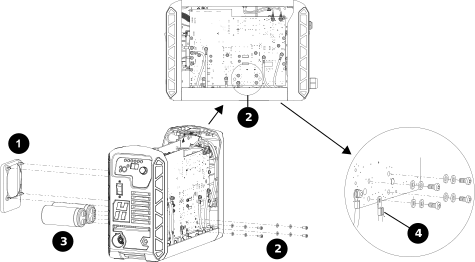
1 Fan plenum 2 Screw locations 3 Bulk capacitors 4 Grounding wire
