
Remove the power cord (1-phase models)

  1. Complete the following procedures:
    1. Set the power switch to OFF (O), disconnect the power cord from the power source, and disconnect the gas supply.
    2. Remove the plasma power supply cover and handle.
    3. Remove the component barrier.
    4. Loosen the rear panel.
  2. Make sure the 2 power cord wires are disconnected from the center panel (CSA models) or Electromagnetic Interference (EMI) Printed Circuit Board (PCB) (CE/CCC models).
  3. Make sure the power cord ground wire is disconnected from the heatsink.
  4. Remove the strain relief outer nut to loosen the grip on the cord.
  5. CE/CCC models: Unwrap the power cord wires from the toroid.
  6. Pull the wires out through the strain relief.
  7. If you are not installing a new power cord strain relief, remove the strain relief inner nut.

    Separate the strain relief from the rear panel.

    Figure 1. Components of 1-phase power cords
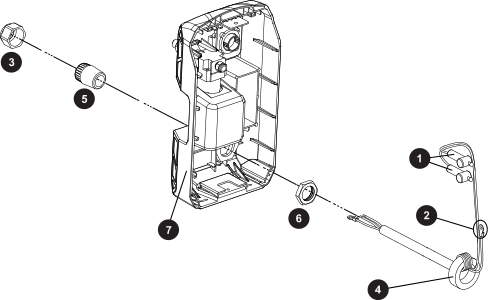
    The image shows the power cord strain relief location on the plasma power supply rear panel.
    1 Two power cord wires
    2 Ground wire
    3 Outer nut
    4 Toroid (CE/CCC only)
    5 Strain relief
    6 Inner nut
    7 Rear panel