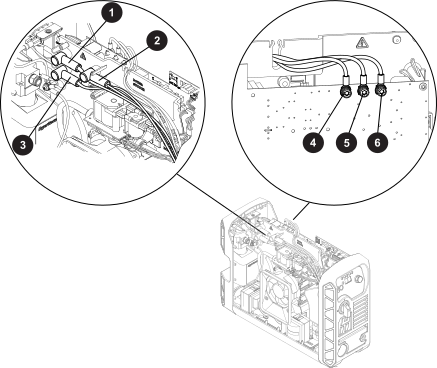
Install internal wires (3-phase models)
-
From the power Printed Circuit Board (PCB) side, connect the following 3
wires to the power PCB as shown.
Tighten to 2.3 N∙m (20 lbf·in).
- Brown wire with white stripe
- Black wire with white stripe
- White wire with black stripe
- Route the wires through the slot in the middle of the center panel and then through the slot near the power switch.
- Slide the red insulating covers onto the new brown wire, white wire, and black wire.
-
From the fan side, connect the following 3 wires to the power cord connection
points on the center panel.
Tighten to 2.3 N∙m (20 lbf·in).
- Brown wire
- White wire
- Black wire
-
Slide the red insulating covers up into place so that they cover the
screws.
Route the wires through the slot in the power switch area behind the front panel.
- Wrap a cable tie around the 6 new wires above the solenoid valve.
-
Connect the 3 green ground wires to the ground stud on the center panel as
shown in Internal ground wire connections.
Tighten to 1.7 N∙m (15 lbf·in).
Note:Rotate the ground wire terminals on the stud so that each wire points in a different direction.
-
Connect the short ground wire to the air filter assembly.
Tighten to 2.3 N∙m (20 lbf·in).
-
Connect the long ground wire to the metal base plate for the magnetics
assembly.
Tighten to 1.7 N∙m (15 lbf·in).
- Connect the push-on connector for the third ground wire to the ground clip on the rear panel.
-
Complete the following procedures:
- Install the power switch (3-phase).
- Install the component barrier.
- Install the plasma power supply cover and handle.
- Reconnect the gas supply.
-
Reconnect the power cord.
Figure 1. The 3-phase wire connections in the plasma power supply 1 Brown wire 2 White wire 3 Black wire 4 Brown wire with white stripe 5 Black wire with white stripe 6 White wire with black stripe