Remove the power PCB

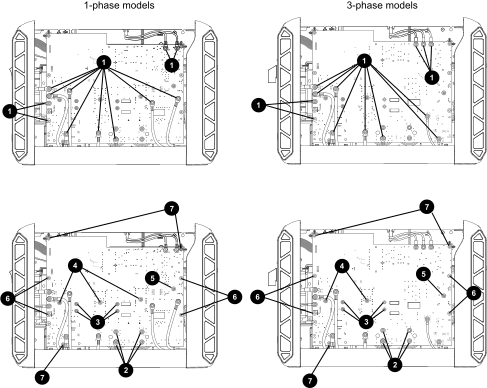
Figure 1. Screws to remove components from the plasma power PCB
The image shows the 1 -phase and 3-phase plasma power boards and their various components.
1 Screws that secure wires (12 for 1-phase; 13 for 3-phase)
2 Capacitor screws (4)
3 Snubber resistor screws (4)
4 Insulated-gate Bipolar Transistor (IGBT) screws (3 for 1-phase; 2 for 3-phase)
5 Rectifier screw (1)
6 Machine screws – standoff (4)
7 Self-tapping screws – standoff (3)

When replacing the power Printed Circuit Board (PCB), also check the snubber resistors. Refer to Do an initial resistance check.

  1. Complete the following procedures:
    1. Set the power switch to OFF (O), disconnect the power cord from the power source, and disconnect the gas supply.
    2. Remove the plasma power supply cover and handle.
    3. Remove the component barrier.
  2. Get a photograph of the power PCB so that you have a record of how all the screws and wires are attached.
  3. Remove the screw-secured wires from the power PCB.
    • 1-phase models have 12 wires.
    • 3-phase models have 13 wires.
  4. Remove the 3 remaining capacitor screws.
  5. Remove the 4 snubber resistor screws.
  6. Remove the IGBT screws.
    • 1-phase models have 3 IGBT screws.
    • 3-phase models have 2 IGBT screws.
  7. Remove the rectifier screw.
  8. Remove the standoff screws.

    There are 3 self-tapping screws and 4 machine screws.

  9. Unplug all the connectors from the power PCB.
  10. Slowly pull the power PCB straight back and away from the unit.
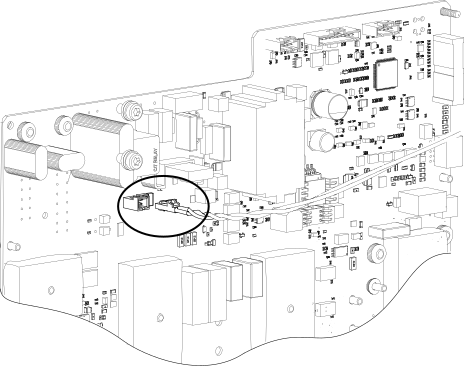
    • 1-phase models: Unplug the J10 2-wire connector from the power PCB.
    • 3-phase models: There is no J10 connection.
    Figure 2. J10 connector on the 1-phase power PCB
  11. Remove the power PCB from the unit.