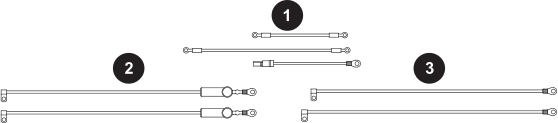
| 1 |
Ground wires |
| 2 |
Wires that go from the power switch to the power cord (CSA) or
Electromagnetic Interference (EMI)
Printed Circuit Board (PCB) (CE/CCC) |
| 3 |
Wires that go from the power switch to the power PCB |
-
Complete the following procedures:
-
From the power board side, disconnect the power switch black wire and white
wire from the power board.
-
From the fan side, disconnect the power switch brown wire and blue wire from
these locations:
- CSA models: Power cord connection points on the center
panel
- CE/CCC models: "SW OUT" side of the EMI
PCB
-
Disconnect the 3 ground wires from the ground stud on the center panel.
Note:
If there are ground wires from the machine interface port or RS-485
connector, leave those terminals in place on the ground stud.
-
Disconnect the other end of each ground wire from these locations:
- Air filter assembly
- Ground clip on the rear panel
- Magnetics assembly base plate
