
Install the bulk capacitors

  1. Insert the new capacitors from the fan side of the plasma power supply.

    See the figure found in this section.

  2. Rotate each capacitor until the polarity dot aligns with the viewing hole on the power Printed Circuit Board (PCB).

    See the figure found in this section.

  3. Attach the capacitors to the power PCB with the 4 mounting screws.

    Secure the transformer wire to the RED location. Start the 4 screws by hand then tighten to 2.3 N∙m (20 lbf·in).
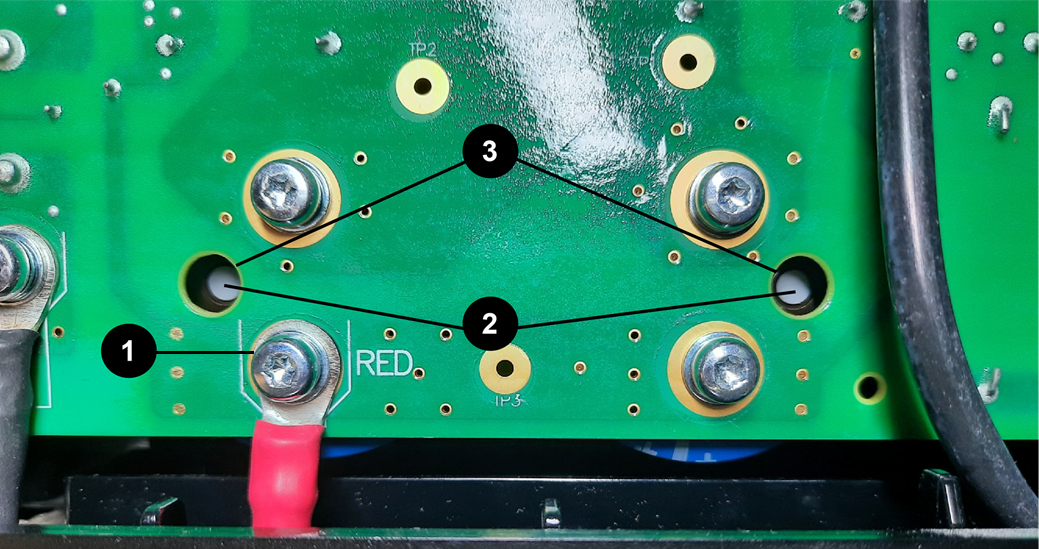
    The image shows the backside of the control board showing the capacitor insertion points.
    1 Transformer wire
    2 Polarity dot
    3 Viewing hole
  4. Align the 4 clips on the fan plenum to the slot locations on the fan and press it into place.
  5. Complete the following procedures:
    1. Install the component barrier.
    2. Install the plasma power supply cover and handle.
    3. Reconnect the gas supply.
    4. Reconnect the power cord.