
Install the torch quick-disconnect receptacle
-
Slide the red wire pair from the new quick-disconnect receptacle through the
braided fiberglass sleeve.
Note:
It may be easier to remove the sleeve from the center panel pass-through slot when sliding the red wires through it.
- Make sure the braided fiberglass sleeve is set in the center panel pass-through slot.
-
Connect the red wire pair to the RED (J15) connection point on the power Printed Circuit Board (PCB).
Tighten to 2.3 N∙m (20 lbf·in).
-
Connect the cable to J19 on the power PCB.
Route the cable through the same center panel pass-through as the braided fiberglass sleeve.
-
As you install the new receptacle:
- Position the receptacle so the red wires are at the top.
- Place the transformer wire ring terminal between the large plastic washer and the nut.
- Check all wires to make sure no wires are pinched or frayed.
-
Complete the following procedures using the new parts:
- Attach the front panel.
- Install the component barrier.
- Install the plasma power supply cover and handle.
-
Reconnect the gas supply and the power cord.
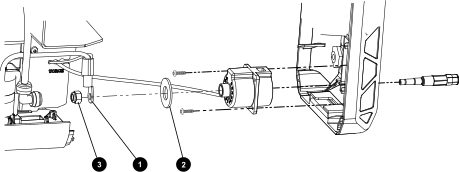
1 Transformer ring terminal 2 Large plastic washer 3 Nut
