
Remove the front panel

To separate and remove the front panel from the plasma power supply, complete this procedure.
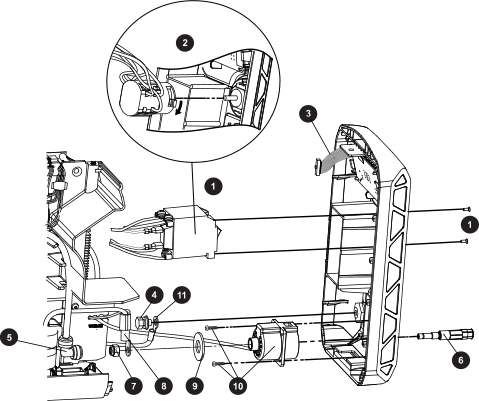
Figure 1. Front panel parts
Exploded view of the front panel on the plasma power supply.
1 1-phase power switch 7 Torch receptacle nut
2 3-phase power switch 8 Transformer wire
3 Display Printed Circuit Board (PCB) ribbon cable 9 Torch receptacle plastic washer
4 Work lead screw and washers 10 Torch receptacle and screws
5 Gas supply hose 90° fitting 11 Work lead
6 Brass torch fitting
  1. Loosen the front panel.
  2. Separate the power switch from the front panel.
    • 1-phase models: Remove the 2 screws that secure the power switch to the panel.
    • 3-phase models: Hold down the red latch on the power switch body, and pull the assembly out from the shaft on the knob.
  3. Disconnect the display board ribbon cable from the main power PCB.
  4. Push-to-disconnect the gas supply hose 90° fitting from the brass torch fitting.
  5. Unscrew the nut, and remove the transformer wire and the large plastic washer from the fitting.
  6. Remove the 2 screws that secure the torch receptacle to the front panel.
  7. Remove the screw and washers that secure the work lead wire to the work lead receptacle.