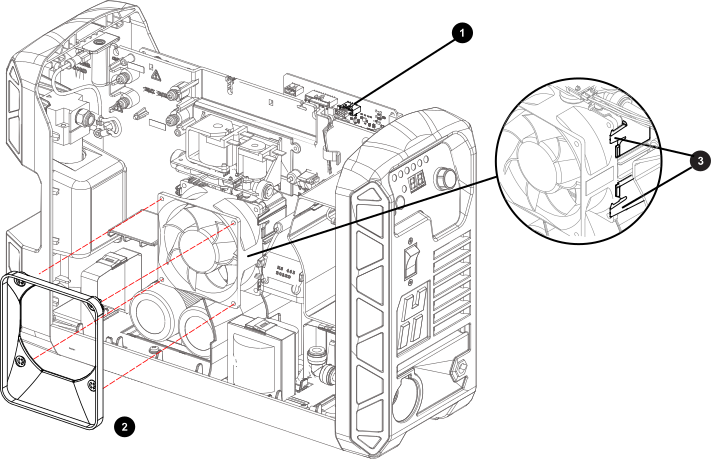
Detach the fan wire connector from J7 on the power Printed Circuit Board (PCB).
Lift the top edge of the component barrier to see the connector.
Remove the fan wires from the pass-through at
the top of the center panel and from the clip on
the center panel.
Note:
If you have the RS-485 serial port installed, you may need to disconnect the RS-485
PCB from J11 on the power PCB to untangle the wires from the PCB and the
fan.
Carefully remove the plenum from the fan
casing.
Release the clips in the top 2 corners of the
plenum before releasing the bottom 2 clips.
Note:
If necessary, use needle-nose pliers to compress and release the top 2 corner clips
before working the bottom 2 clips free from the fan casing.
Notice
DO NOT BREAK THE CLIPS
Be careful not to apply too much pressure to the clips as you disconnect
the plenum from the fan.
Remove the fan by pushing back the 2 clips on
the right side of the fan until the fan assembly
is released.
Note:
The fan does not use any mounting screws to attach to the center panel.