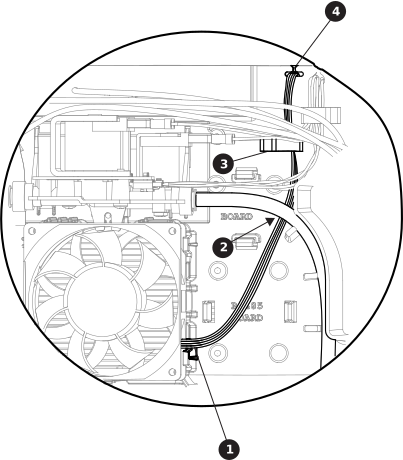
Do not put wires below the fan. If wires get pinched behind the fan,
this can cause damage to the wires and prevent the fan from operating
correctly.
To confirm you have the right fan, check the barcode sticker on the side of the fan.
Fans for 3-phase models have a 6-digit Hypertherm® part number (429225) on the sticker. Fans for
1-phase models have only the barcode on the sticker.
1
Wires on the bottom right corner
2
Gas tube
3
Center panel clip
4
Pass-through
Snap the new fan into place on the center panel.
Position the fan so the wires extend from the bottom right corner as
shown.
Put the left side of the fan into place first, then push in the right
side of the fan until it snaps into place.
Make sure no wires are pinched behind the fan, and check each
side and corner around the fan.
Route the wires for the fan as follows.
Behind the gas tube and the wires from the solenoid valve.
Through the clip on the center panel.
Through the pass-through labeled "FAN" at the top of the center
panel.
Plug the wire connector into J7 on the power Printed Circuit Board (PCB).
Align the 4 clips on the new fan plenum to the slot locations on the fan and
press it into place.