Some conditions do not give a diagnostic code. For example, there are no diagnostic
codes (and the cutting system does not work) if electric power is removed from the cutting
system.
Before you try to identify a performance issue that does not cause a diagnostic
code, make sure to first look for obvious problems or damage. Always start with
the following inspection steps:
Make sure that the cutting
system is connected to electric power.
Use a licensed electrician to measure the line voltage between the
terminals that are inside of the plasma power supply.
For many troubleshooting procedures it is necessary to remove the power from the
cutting system. To do this safely, use the following procedure. Even if you use
the remote on-off switch to set the power to OFF, electricity stays inside the
cutting system. You can still get a serious electric shock when the cutting
system is connected to an electric power source.
Note:
Before you remove the power from the cutting system, it can be helpful to
move the torch to the edge of the cutting table and then move the torch
lifter to its highest point. This gives easier access to the torch and
consumable parts.
Remove the power from the cutting system
Set the line-disconnect switch to the OFF position.
If the cutting system is not hard wired, disconnect the main power cord
from the electric power.
If the cutting system is hard wired, you cannot disconnect the main
power cord from the electric power.
Even if you remove the power from the cutting system, you can still
get a serious electric shock if the plasma power supply stays
connected to an electric power source. Use extreme care during
service and maintenance when the cutting system is connected to
electricity.
Make sure that the power-indicator Light Emitting Diode (LED) is not illuminated on the plasma power
supply, gas connect console, or TorchConnect™ console.
Examine each PCB
Remove the power from the cutting
system.
Remove the external panel or panels from the system component that has
the PCB that you want to
examine.
If each PCB is in good
condition, measure the line voltage between the terminals inside of the
plasma power supply.
If you cannot find
or correct the problem, speak to your cutting machine supplier or regional Hypertherm® Technical Service team.
It is necessary for the cutting system to have electric power to measure line
voltage. Use extreme caution if you do diagnosis or maintenance tasks when the
plasma power supply stays plugged in and the panels on the plasma power supply
are removed.
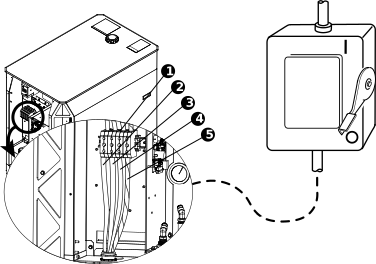
Figure 1. Main power cord wire color and terminal location
Wire color codes for North America
Wire color codes for Europe, Asia, and most locations outside
of North America
1
TB1 terminal
–
–
2
U
Black
Black
3
V
White
Blue
4
W
Red
Brown
5
GND (PE) (earth ground)
Green/yellow
Green/yellow
Measure the line voltage between the terminals inside the plasma power
supply
Measure the line voltage between the terminals in the following
order:
U to V
U to W
V to W
Do a check of each line to ground.
Find if the voltage between any two of the three lines is equal to the
supply voltage.
If any one line is equal to or 10% greater than the other two lines,
examine the incoming electric supply lines.
If the incoming electric supply lines are good, speak to a licensed
electrician or the electric company that supplies electricity for
more information.
If the voltage between any two of the three lines is less than the
supply voltage:
Remove the power from the cutting
system.
Examine the power cord for damage.
Examine the fuses at the line-disconnect switch for
continuity.
Repair or replace any parts that are defective or have damage,
if found.
Continue to do these steps until the line voltage between any two of
the three lines is equal to the supply voltage.