
Connect to the plasma power supply with discrete
Do these steps to connect the plasma power supply to the Computer Numerical Control (CNC) with discrete cables.
- Remove the rear panel of the plasma power supply.
- Put End A of the discrete cable through the hole in the bottom of the rear compartment in the plasma power supply.
- Connect J14 and J19 to their respective connectors on the control Printed Circuit Board (PCB) in the plasma power supply.
- Connect End B of the cable to the CNC.
- Put End A of the discrete cable for the expansion PCB through the hole in the bottom of the rear compartment of the plasma power supply.
- Connect End A of the discrete cable for the expansion PCB to the J4 connector on the expansion PCB.
- Connect End B of the discrete cable for the expansion PCB to the CNC.
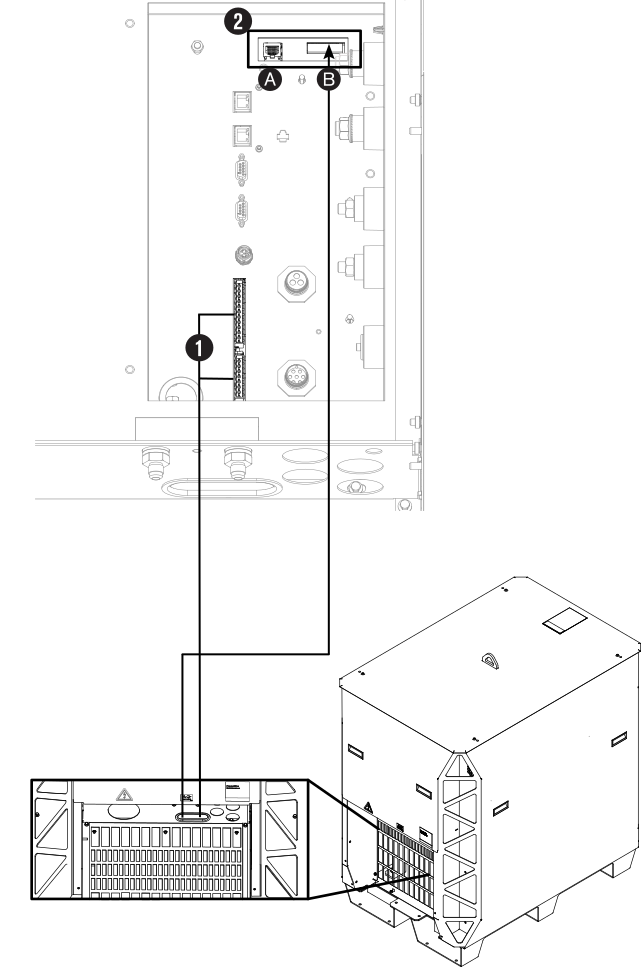
| 1 | Discrete cables in from the CNC. |
|---|---|
| 2A | Ethernet LAN port: For future applications. Do not use. |
| 2B | Expansion PCB connectors: Necessary for redundant remote on-off feature, alternate 24 VDC power input, and analog estimated arc voltage output. |