
Connect the cooler
Use this information to connect the hoses, cables, and leads to the cooler.
- Put the plasma power supply in position
- Ground the system components
- Prepare the hoses, cables, and leads
- Refer to the image that shows the connectors on the rear of the cooler.
Figure 1. Connectors on the rear of the cooler 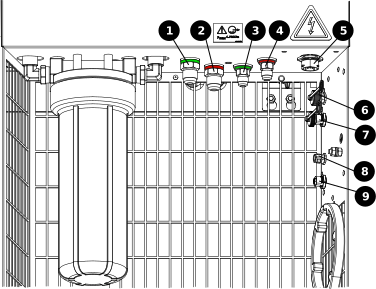
1 Coolant supply to the gas connect console 2 Coolant return from the gas connect console 3 Coolant supply to the plasma power supply 4 Coolant return from the plasma power supply 5 Power, 220 VAC, from the plasma power supply 6 Not used 7 Not used 8 Controller Area Network (CAN) in from the plasma power supply 9 CAN out to the gas connect console
-
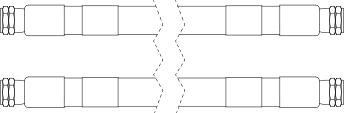
Connect the coolant-hose assembly to the cooler from the plasma power
supply:
 Note:
Note:The coolant-hose assembly includes one coolant-supply hose with green bands and one coolant-return hose with red bands.
Refer to Coolant-hose assemblies (cooler to plasma power supply) for lenghts and part numbers.
- Connect the coolant-return hose with the red band to the red coolant-return fitting.
- Connect the coolant-supply hose with the green band to the green coolant-supply fitting.
-
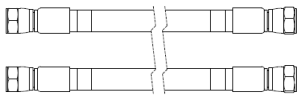
Connect the coolant-hose assembly to the cooler from the gas connect
console:
 Note:
Note:Refer to Coolant-hose assemblies (cooler to gas connect console) for lengths and part numbers.
- Connect the coolant-return hose with the red band to the red coolant-return fitting.
- Connect the coolant-supply hose with the green band to the green coolant-supply fitting.
-
Connect the
female
cable connector on the 220
VAC power cable to the cooler
from the plasma power supply.
Note:
Use your fingers to tighten these connections, do not use tools.
 Note:
Note:Refer to Power cables, 220 VAC for lengths and part numbers.
-
Connect both CAN cables:
Note:
Use your fingers to tighten these connections, do not use tools.
 Note:
Note:Refer to CAN cables for lengths and part numbers.
- Connect the male cable connector on one CAN cable to the cooler from the gas connect console.
- Connect the female cable connector on the other CAN cable to the cooler from the plasma power supply.
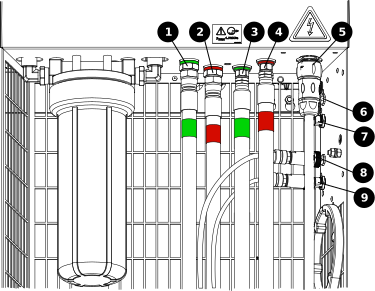
| 1 | Coolant supply to the gas connect console |
|---|---|
| 2 | Coolant return from the gas connect console |
| 3 | Coolant supply to the plasma power supply |
| 4 | Coolant return from the plasma power supply |
| 5 | Power, 220 VAC, from the plasma power supply |
| 6 | Not used |
| 7 | Not used |
| 8 | CAN in from the plasma power supply |
| 9 | CAN out to the gas connect console |