
Connect the gas connect console
Use this information to connect the hoses, cables, and leads to the gas connect console.
- Put the plasma power supply in position
- Ground the system components
- Prepare the hoses, cables, and leads
- Refer to the image that shows the connections on the gas connect console.
Figure 1. Connectors for hoses, cables, and leads in the gas connect console 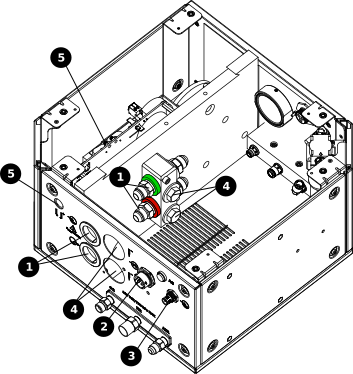
1 Coolant-supply (green) and coolant-return (red) hoses 2 Power cable, 120 VAC 3 Controller Area Network (CAN) cable 4 Negative cables 5 Pilot-arc cable
The images that follow show an example gas connect console. Your gas connect console could look different.
-
Connect the coolant-hose assembly to the
gas connect console from the cooler.
 Note:
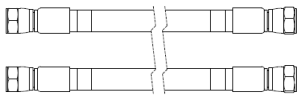
Note:The coolant-hose assembly includes one coolant-supply hose with green bands and one coolant-return hose with red bands. At least one coolant-hose assembly is necessary for all cutting systems. Some cutting systems use two coolant-hose assemblies.
- Connect the coolant-return hose with the red bands to the coolant-return fitting with the red band.
- Connect the coolant-supply hose with the green bands to the coolant-supply fitting with the green band.
-
Connect the female cable connector on the 120 VAC power cable to the gas
connect console from the plasma power supply.
 Note:
Note:At least one 120 VAC power cable is necessary for all cutting systems. Some cutting systems use one 120 VAC power cable and one 220 VAC power cable.
-
Connect the female cable connector on the CAN cable to the gas connect console from the
cooler.

-
Connect the negative cable or cables to the coolant manifold in the gas connect
console from the plasma power supply.
Figure 2. Negative cable with strain relief 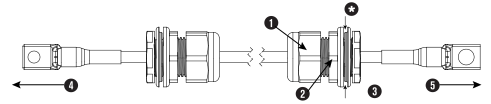
1 Outer nut 2 Strain relief nut 3 Inner nut 4 To plasma power supply 5 To gas connect console * The sheet metal of the internal console panel intersects here. Note:At least one negative cable is necessary for all cutting systems. Some cutting systems use two negative cables.
- Remove the inner nut from the strain relief assembly on each negative cable.
- Before you put the negative cables through the holes in the sheet metal panel on the gas connect console, remove the two M3 hex nuts to remove the cover for the second strain-relief mounting hole.
- Put the cable and strain relief nut for both negative cables through the holes in the sheet metal panel.
- Put the inner nut from the strain relief assembly over the end of each negative cable.
- Tighten the inner nut to the strain relief nut for each negative cable.
-
Connect the pilot-arc cable to the gas connect console from the plasma power
supply.
 Note:
Note:The strain relief nut on the pilot-arc cable is not necessary for this connection. Remove the nut from the cable and tighten the strain relief to the panel on the gas connect console.
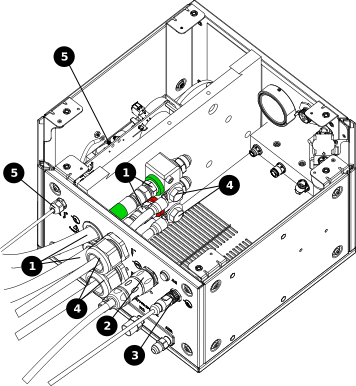
| 1 | Coolant-supply (green) and coolant-return (red) hoses |
|---|---|
| 2 | Power cable, 120 VAC |
| 3 | CAN cable |
| 4 | Negative cables |
| 5 | Pilot-arc cable |