
Step 4 – Install the cartridge
Install the correct cartridge for the cutting that you want to do. Unlock the torch to fire a plasma arc.
SmartSYNC® torches include a switch that lets you lock the torch. This torch-lock switch prevents the torch from firing accidentally, even when the plasma power supply is ON. Cartridges are not preinstalled on new torches.
- The torch is not in use
- You change the Hypertherm® cartridge
- You move the plasma power supply or torch while the plasma power supply is ON
| Warning | |
|---|---|
 | |
-
Make sure that the torch-lock switch on the torch is set to the yellow lock
(X) position.
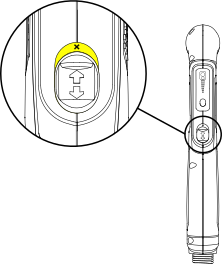
-
Place the cartridge on the torch, and tighten it 1/4 of a turn to install
it.
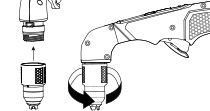
The Torch Cap Light Emitting Diode (LED) on the front panel comes on when you remove the consumables or set the torch-disable switch to the yellow lock (X) position while the plasma power supply is still ON. The LED extinguishes after you install the consumables and set the torch-disable switch to the green "ready to fire" position.
