
Cutting and gouging controls

|
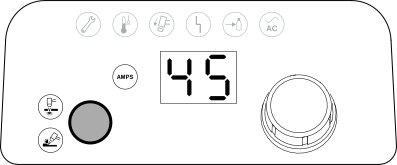
Mode button Push
this button to toggle between cut mode and gouge mode. The
system automatically adjusts the gas pressure
to
align with:
|

|
Cut Mode Light Emitting Diode (LED) (green) When illuminated, this LED identifies that the system is ready to perform plasma cutting operations. |

|
Gouge Mode LED (green) When illuminated, this LED identifies that the system is ready to perform plasma gouging operations. |

|
2-digit display This display shows the output current by default. When some system faults occur, this display shows a fault code. Refer to Fault icons and fault codes. If you manually adjust system settings, such as the gas pressure for example, this display shows this information. Refer to Manual adjustments to gas pressure and current. |

|
AMPS LED (green) When illuminated, this LED identifies that the 2-digit display shows the cutting current (amperage). When the 2-digit display shows other values, such as gas pressure or a fault code, the AMPS LED is not illuminated. |

|
Adjustment knob Use this knob to set the cutting current between 9 A and 45 A in 1-unit increments. You can also use this knob to increase or decrease the gas pressure. |