
Step 3 – Connect the work lead and work clamp
| Notice | |
|---|---|
INCORRECT WORK LEADS CAN CAUSE AN UNSTABLE PLASMA ARC
Work leads are approved for specified amperages, lengths, and
connectors. Make sure that you use a work lead that is approved for your plasma
power supply. Refer to the Powermax45/65/85/105 SYNC Parts Guide
(810490). The amperage of a work lead is identified near the rubber
boot of the work lead connector.
| |
| Notice | |
|---|---|
LOOSE WORK LEADS CAN OVERHEAT
When you move the work lead or the plasma power supply, examine the work
lead connector to make sure that it is fully and tightly connected to the plasma
power supply.
| |
| Notice | |
|---|---|
CORRECTLY ATTACH THE WORK CLAMP
Do not attach the work clamp under water. If the plasma power supply is
below the work clamp, water can get into the plasma power supply through the
work lead and cause much damage.
Do not attach the work clamp to the part of the workpiece to be cut
away.
| |
Connect the work lead
-
Put the work lead connector in the receptacle on the front of the plasma power
supply.
Align the key on the connector with the opening in the receptacle.
- Turn the connector clockwise approximately 1/4 turn until the connector is fully engaged and locked in position.
Connect the work clamp
- Remove rust, dirt, paint, coatings, and other debris from the workpiece so that the work clamp makes sufficient contact with the workpiece or cutting table.
-
Attach the work clamp as close as possible to the area being cut, and make sure
that the work clamp makes good metal-to-metal contact with the workpiece or
cutting table.
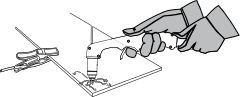
- Hand cutting: The work clamp must be connected to the workpiece that you are cutting.
- Mechanized cutting: If you are using this plasma power supply with a mechanized cutting system, you can connect the work clamp directly to the cutting table or to the workpiece you are cutting. Refer to your equipment manufacturer’s instructions.
