
Indicator LEDs
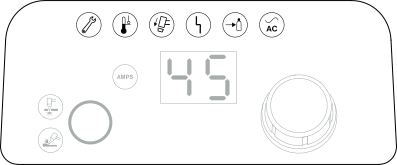

|
Power ON Light Emitting Diode (LED) (green) When illuminated, this LED identifies that the power switch is set to ON (I) and the system is ready to cut. |

|
Gas Pressure LED (yellow) When illuminated, this fault LED identifies that the inlet gas pressure is too low or that there is no inlet gas connection. Refer to Fault icons and fault codes. |

|
System Fault LED (yellow) When illuminated, this fault LED identifies that there is a fault with the plasma power supply. In many instances, when this LED illuminates, a fault code also flashes on the 2-digit display. Refer to Fault icons and fault codes. |

|
Torch Cap LED (yellow) When illuminated, this fault LED identifies that the consumables are loose, incorrectly installed, or missing. Refer to Fault icons and fault codes. |

|
Temperature LED (yellow) When illuminated, this fault LED identifies that the system’s temperature is outside the permitted operating range. Refer to Fault icons and fault codes. |

|
Service LED This LED is used by qualified service technicians for troubleshooting the plasma power supply. |
Some fault conditions cause more than one LED to illuminate or flash at the same time. For information on what these fault conditions are and how to clear them, refer to Fault icons and fault codes.