
Prepare to fire the torch
To prevent accidental firing, the hand torch has a torch-lock switch and a safety trigger.
| Warning | |
|---|---|
 | |
| Warning | |
|---|---|
| |
| Warning | |
|---|---|
    | |
-
Install the correct cartridge.
Option Description To cut When you install a Hypertherm® cutting cartridge, the system goes to Cut mode. Gouge mode is not available. 
To gouge When you install a Hypertherm gouging cartridge, the system goes to Gouge mode. Cut mode is not available. 
-
Make sure that the torch-lock switch is in the green "ready to fire"
position.
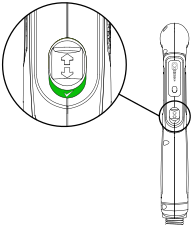 Note:
Note:The first time that you pull the torch trigger after you set the torch to the "ready to fire" position, multiple puffs of air quickly come from the torch. This is a warning that the torch is active and will fire an arc the next time that you pull the trigger.
-
Flip the trigger’s safety cover forward and pull the red torch trigger.
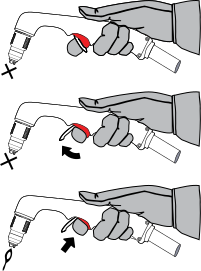
- After you complete a cut and release the torch trigger, air continues to flow from the torch to decrease the temperature of the cartridge.
- This is referred to as postflow.
- Always let postflow complete before you remove a cartridge.