
Use EtherCAT or serial RS-422 to enable or disable manual-set mode
Do these steps to use EtherCAT® or serial RS-422 to enable or disable manual-set mode.
-
From the Computer Numerical Control (CNC) screen or other control
device use command 914 to choose the condition you want:
Option Description To enable manual-set mode Choose 1=Enable in the Data field. When manual-set mode is enabled, the DISABLE button shows red. To disable manual-set mode Choose 0=Disable in the Data field. When manual-set mode is disabled, the ENABLE button shows gray. 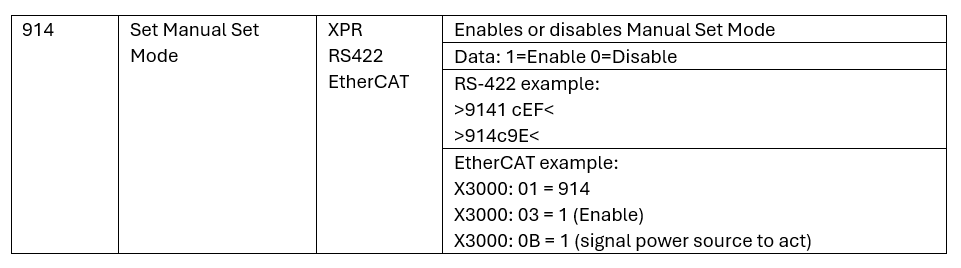
When manual-set mode is enabled, the cutting system automatically uses the process that is set in manual-set mode every time power is supplied to the cutting system and until that process is canceled or changed.
If you want to change or cancel the settings, offsets, or detection modes for the active manual-set mode process, refer to Process selection.