Connect to the plasma power supply with serial RS-422

The serial RS-422 cable connects the plasma power supply to other components for data transfer.

Pinouts for serial RS-422 interface cables

  1. Remove the rear panel of the plasma power supply.
  2. Put End A of the serial RS-422 cable through the hole in the bottom of the rear compartment in the plasma power supply.
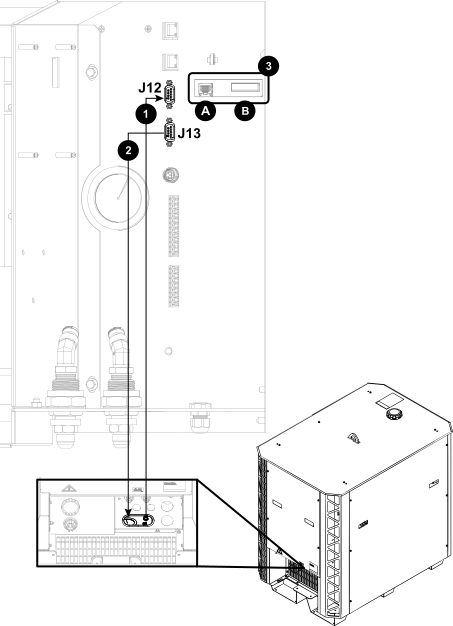
  3. Connect End A of the serial RS-422 cable to the correct connector on the control Printed Circuit Board (PCB) in the plasma power supply:
    • For cutting systems with multiple plasma power supplies, use the top connector (J12) for the Computer Numerical Control (CNC). Use the bottom connector (J13) to connect to the next plasma power supply.
    • For cutting systems with one plasma power supply, you can use either connector to connect to the CNC.
  4. Connect End B of the cable to the CNC.
  5. If you want to operate the cutting system, continue with the next step.

    If you want to only monitor with serial RS-422, you are done.

  6. Connect to the plasma power supply with discrete.
  7. Install the rear panel of the plasma power supply.
Figure 1. Connect the serial RS-422 cable to the plasma power supply
The image shows where to connect the RS-422 cables to the plasma power supply.
1 Serial RS-422 in from the CNC
2 Serial RS-422 out to the next plasma power supply (if necessary)
3A Ethernet Local Area Network (LAN) port
3B Expansion PCB connectors: Necessary for redundant remote on-off feature, alternate 24 VDC power input, and analog estimated arc voltage output.