
Connect the VDC3 PCB (141511) (if applicable)

After installing the VDC3 Printed Circuit Board (PCB) in the plasma power supply, you must make the necessary connections with the included wire bundle.

  1. Remove the wire bundle from the wire clip in the plasma power supply.

    The wire bundle is included in the plasma power supply. The bundle includes the arc voltage wires and power wires.
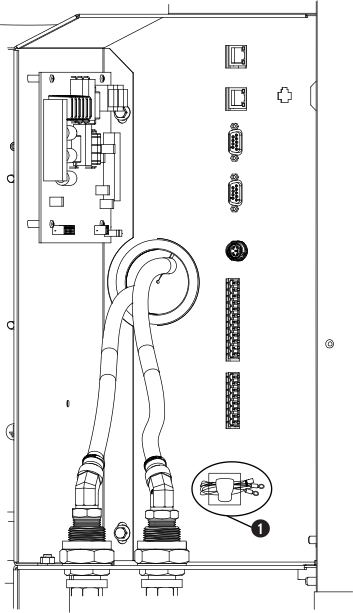
    This image shows the wire bundle to remove from the wire clip.
    1 Location of example wire clip and wire bundle in the plasma power supply
  2. Connect one end of the VDC3 120 VAC harness to J1 of the VDC3 PCB with the tab on top, as shown.
  3. Connect the other end of the VDC3 120 VAC harness to the 120 VAC connector.
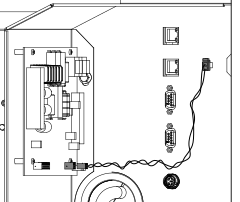
    This image shows the VDC3 120 VAC harness connections.
  4. Attach the spade connector of the yellow wire (WORK) to the J3-WORK terminal, as shown.
  5. Attach the spade connector of the yellow/black wire (NEG) to the J3-ELECTRODE terminal.
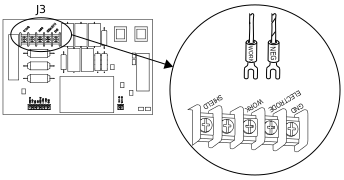
    This image shows the yellow (WORK) and yellow/black (NEG) wires connected to J3.
  6. Attach the ring connector on the yellow wire (WORK) to the work bolt in the plasma power supply.

    Tighten the nut to 20 N∙m (15 lbf∙ft).

  7. Attach the ring connector on the yellow/black wire (NEG) to the negative bolt in the plasma power supply.

    Other wires are already attached to the bolts in the plasma power supply. Attach the arc voltage wires on top of the existing wires.

    Tighten the nut to 20 N∙m (15 lbf∙ft).
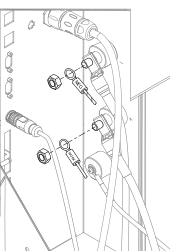
    This image shows the yellow (WORK) wire connected to the work bolt and the yellow/black (NEG) wire connected to the negative bolt in the plasma power supply.
  8. Use NCS (pin 3), NCE (pin 4), Aout+ (pin 6), and Aout- (pin 7) to connect to the Computer Numerical Control (CNC).

    Refer to Diagram of PCB, cable, and wire connections (if applicable) for the locations of the pins and for the pinout.

  9. Install the rear panel of the plasma power supply.

Use the interface requirements of your CNC for additional connection requirements.