
Go back to automatic settings mode
-
Push the
Mode
button
to go back to automatic settings mode.
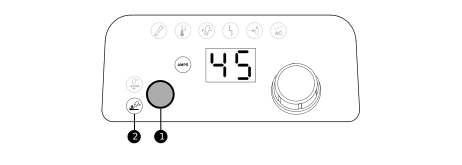
1 Mode button 2 Mode Light Emitting Diode (LED)
- The selected mode LED next to the button stops flashing.
- When you change from manual gas pressure mode to automatic gas pressure
mode:
- The plasma power supply automatically sets the gas pressure related to the Hypertherm® cartridge.
- The amperage setting stays the same.
- When you change from automatic gas pressure mode to manual gas pressure
mode:
- The plasma power supply uses the last manual gas pressure that you set.
- The amperage setting stays the same.
- When you do a quick restart or a cold restart of the plasma power supply in manual gas pressure mode, the plasma power supply keeps the last manual gas pressure and amperage that you set unless you install a different type of cartridge.
- When you connect a different torch, the plasma power supply goes back to automatic gas pressure mode.