The plasma arc goes out while you are cutting, or the torch will intermittently not fire
The work lead is defective or the work lead connection is insufficient for some reason
- If possible, move the work clamp closer to the area of the workpiece you are cutting.
- Clean the area where the work clamp comes into contact with the workpiece or cutting table, and remove rust, paint, or other residue.
- Make sure that the cutting table is correctly grounded and has good contact with the workpiece.
- Examine the work lead for a loose connection at the plasma power supply and at the work clamp.
- Examine the work clamp, and repair or replace the clamp if necessary.
- Examine the work lead, and repair or replace the lead if necessary.
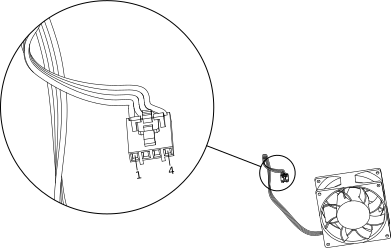
The fan is defective
-
Use pin 1 (red) and pin 4 (black) on the J7 fan connector, and connect the fan to an
external 12 V or 24 V power source.