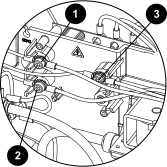
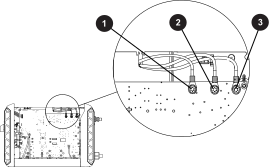
Troubleshooting for input voltage faults

A flashing Power ON Light Emitting Diode (LED) can identify a problem with the input voltage.

Fault codes and fault LEDs

Fault code Fault LEDs Torch LED Description Stops the system from operating?
None The image shows the Power ON Light Emitting Diode flashing.

Flashes

The image shows the System Fault Light Emitting Diode.

ON

The image shows the torch Light Emitting Diode illuminated yellow.

Yellow

An Alternating Current (AC) input voltage phase loss occurred. This is applicable only to 3-phase models. Yes. A cold restart is necessary.
None The image shows the AC Power Light Emitting Diode flashing.

Flashes

The image shows the torch Light Emitting Diode illuminated yellow.

Yellow

The AC input voltage is too low (>10% less than the rated voltage for 1-phase models or >15% less than the rated voltage for 3-phase models) or too high (>10% more than the rated voltage for 1-phase models or >15% more than the rated voltage for 3-phase models). Yes. A cold restart is necessary.

Examine the incoming line voltage

  1. If applicable, disconnect the system from generator power.
  2. What fault LED do you see?
    If you see this fault LED...Do these steps...
    The Power ON LED flashes and the System Fault LED is illuminated. Have an electrical technician examine all input phases, fuses, and breakers for correct voltage (phase-to-phase and phase-to-ground) at the power source and at the plasma power supply.
    The Power ON LED flashes. Have an electrical technician examine the line and increase or decrease the voltage.
  3. If you see the same fault condition, continue with the next procedure.

Corrective action for the incoming line voltage

  1. Set the power switch to OFF (O), and disconnect the power cord from the power source.
  2. Remove the plasma power supply handle and cover.
  3. Remove the component barrier.
  4. From the fan side of the plasma power supply, pull the red insulating covers off the power cord and power switch wires.
  5. Reconnect the electric power, but keep the power switch in the OFF (O) position.
  6. From the fan side of the plasma power supply, examine the line voltage on the power switch wires with the power switch in the OFF (O) position.
    • 1-phase CSA models: Measure the voltage at the blue and brown wire connections on the center panel.
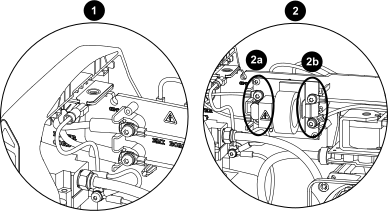
      The image shows where to measure the voltage in a 1-phase system.
      1 CSA 1-phase
      2 CE/CCC 1-phase
      2a AC in
      2b AC out
    • 1-phase CE/CCC models: Wait approximately 10 minutes for internal voltages to discharge, and measure the voltage at the blue and brown power switch wire connections on the right side of the Electromagnetic Interference (EMI) Printed Circuit Board (PCB) that have the label SW OUT. OptionDescription
      If you get a voltage reading... Continue with the next step.
      If you get no voltage reading, or if the voltage reading is very low... Measure the voltage at the blue and brown power cord wire connections on the left side of the EMI PCB that have the label AC IN.
      If the voltage is correct on the power cord wires but incorrect on the power switch wires... Replace the EMI PCB.
    • 3-phase models: Measure the voltage at the wire connections on the center panel:
      • White wire (WHT) to black wire (BLK)
      • White wire (WHT) to brown wire (BRN)
      • Black wire (BLK) to brown wire (BRN)
      The image shows where to measure the voltage in a 3-phase system.
      1 Brown
      2 Black
      3 White
  7. Is the voltage the same as the line voltage of the incoming circuit, and is it correct for the model of the plasma power supply? OptionDescription
    If yes... Continue with the next step.
    If no... Do a check to find if you have power to the system. If you do have power, examine the power cord and its plug for damage, and replace it if necessary.

    All values can be ±15%. Refer to the Powermax45 SYNC Operator Manual (811470) for the voltage requirements of each plasma power supply configuration.

  8. If the power source and power cord are operating correctly, set the power switch to ON (I).
  9. Measure the AC voltage to make sure that the AC voltage is the same as the incoming line voltage.
    • 1-phase models: Measure the voltage from J1 (WHT) to J2 (BLK).
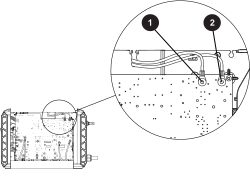
      The image shows the incoming power wire locations on the 1-phase plasma power supply.
      1 J2 (black)
      2 J1 (white)
    • 3-phase models: Measure the voltage:
      • J1 (WHT – white wire with black stripe) to J2 (BLK – black wire with white stripe)
      • J2 to J4 (BRN – brown wire with white stripe)
      • J1 to J4
      The image shows the incoming power wire locations on the 3-phase plasma power supply.
      1 J1 (white)
      2 J2 (black)
      3 J4 (brown)
  10. If the voltage reading is too high or too low, set the power switch to OFF (O), and disconnect the power cord from the power source.
  11. Examine the wires that go from the power switch to the power PCB and from the power switch to the center panel (or EMI PCB).
  12. Replace any wires that are frayed or have damage.
  13. If the wires are in good condition and are connected securely, examine the power switch:
    • Make sure that none of the wire connections or screws are loose or have damage.
    • Make sure that there is no damage to the contacts on the power switch.
    • Do a mechanical check of the power switch by setting it to ON and then OFF multiple times.
  14. Replace the power switch if it does not operate correctly and stay in the ON position.
  15. If the system does not operate correctly, continue with the next procedure.

Corrective action for the power PCB voltage

  1. If necessary:
    1. Set the power switch to OFF (O), and disconnect the power cord from the power source.
    2. Remove the plasma power supply handle and cover.
    3. Remove the component barrier.
  2. Reconnect the electric power, and set the power switch to ON (I).
  3. Use a multimeter to measure the voltages in the table to make sure that the power PCB (PCB3) is operating correctly.
    Component Pin number to ground Test Expected value
    Fan Pin 1 on J7 48 VDC 48 VDC ±10%
    Solenoid valve Pin 7 on J8 48 VDC 48 VDC ±10%
    Pin 5 on J8 24 VDC 24 VDC ±10%
    Display PCB Pin 1 on J3 3.3 VDC 3.3 VDC ±10%
    Pin 2 on J3 3.3 VDC 3.3 VDC ±10%
    Pin 4 on J3 5.0 VDC 5.0 VDC ±10%
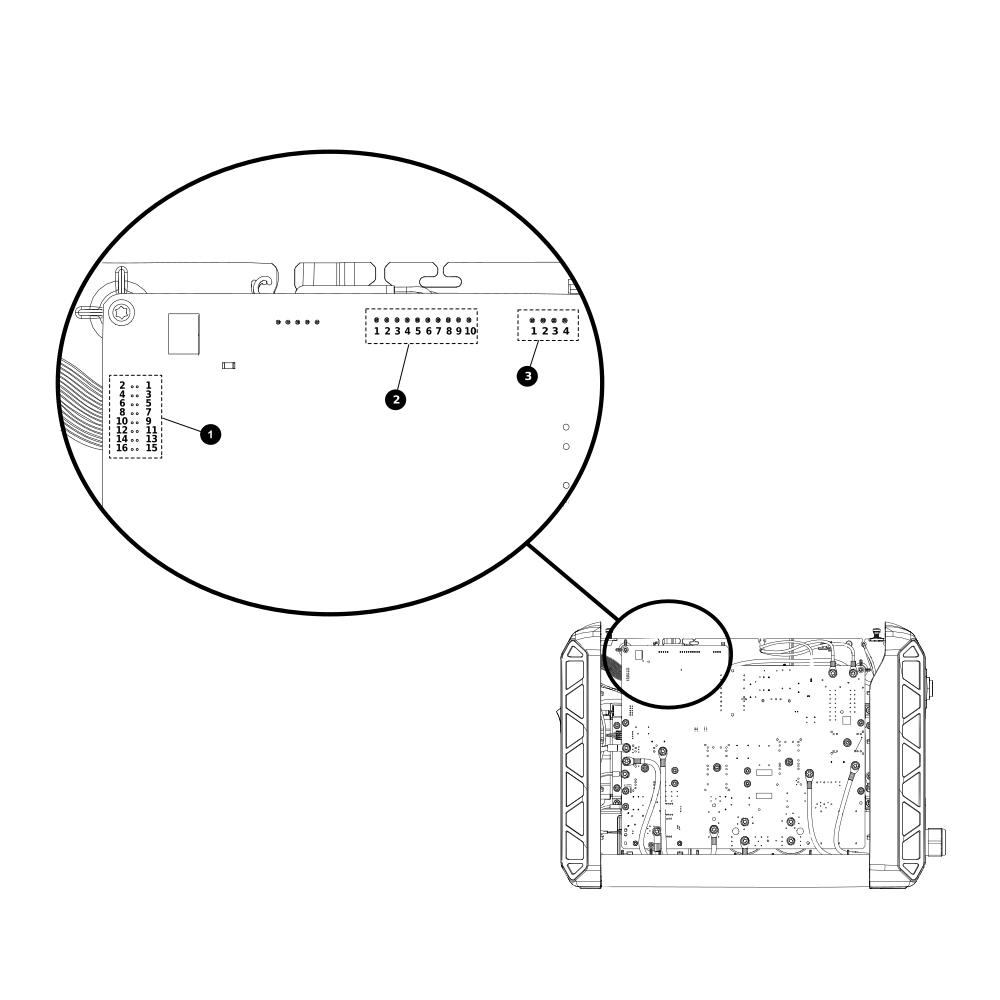
    The image shows the location of J3, J7, and J8 on the power Printed Circuit Board.
    1 J3 display PCB
    2 J8 solenoid valve
    3 J7 fan
  4. Is the 48 VDC voltage for the fan correct? OptionDescription
    If yes... Continue with step 7.
    If no... Continue with the next step.
  5. Disconnect the J7 fan connector from the power PCB, and measure the voltage again from pin 1 on J7 to ground.
  6. Is the voltage now correct? OptionDescription
    If yes... Replace the fan.
    If no... Continue with the next step.
  7. Is the 48 VDC voltage for the solenoid valve correct? OptionDescription
    If yes... Continue with step 10.
    If no... Continue with the next step.
  8. Disconnect the J8 solenoid valve connector from the power PCB, and measure the voltage again from pin 7 on J8 to ground.
  9. Is the voltage now correct? OptionDescription
    If yes... Replace the solenoid valve.
    If no... Continue with the next step.
  10. If the 24 VDC voltage for the solenoid valve is not correct, and if the 3.3 VDC or 5.0 VDC voltage reading at J3 is not correct, disconnect the display PCB ribbon cable from J3 on the power PCB.
  11. Measure the voltage again from pin 1, pin 2, and pin 4 on J3 to ground.
  12. Are the voltages now correct? OptionDescription
    If yes... Replace the display PCB.
    If no... Replace the power PCB.