Troubleshooting for a plasma power supply or torch communication fault (0-98-2)

An 0-98-2 fault code identifies a communication failure between the torch and the plasma power supply.

When this fault occurs, the SmartSYNC® torch is not sending data to the plasma power supply, so the system cannot collect data about the Hypertherm® cartridge. The problem can be with the Hypertherm cartridge or with the SmartSYNC torch. There can be a problem with:
  • The Printed Circuit Board (PCB) in the torch
  • The torch lead
  • The quick-disconnect receptacle
  • The torch communication circuitry on the PCB in the plasma power supply

Fault codes and fault LEDs

Fault code Fault LEDs Torch LED Description Stops the system from operating?
0-98-2 The image shows the general fault Light Emitting Diode.

ON

The image shows the torch Light Emitting Diode illuminated yellow.

Yellow

A communication failure occurred between the torch and the plasma power supply. No. You can continue to cut or gouge, but you must set the output current (A) and the operating mode manually.

Corrective action for the plasma power supply (0-98-2)

  1. Set the power switch on the plasma power supply to OFF (O).
  2. Disconnect the SmartSYNC torch from the plasma power supply.
  3. Set the power switch on the plasma power supply to ON (I).

    A 0-50-0 fault code shows if the torch is disconnected when you set the plasma power supply to ON.

  4. In the quick-disconnect receptacle on the front of the plasma power supply, measure the voltage between pin 5 (blue wire) and pin 7 (orange wire).
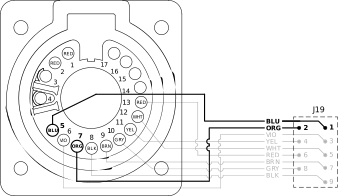
    The images shows the pinouts for the quick-disconnect receptacle.
  5. Is the voltage approximately 15 VDC? OptionDescription
    If yes... The problem is possibly with the torch. Continue with the corrective action steps for the torch in the next procedure.
    If no... Continue with the next step.
  6. At the J19 connector on the power PCB, measure the voltage between pin 1 (blue wire) and pin 2 (orange wire).
  7. Is the voltage approximately 15 VDC? OptionDescription
    If yes... Replace the quick-disconnect receptacle.
    If no... Replace the power PCB.
  8. If communication faults continue, replace the Digital Signal Processor (DSP) PCB.

Corrective action for the torch (0-98-2)

  1. Connect the SmartSYNC torch to the plasma power supply.
  2. Remove the left side of the torch shell.
  3. Make sure that all wires are correctly and securely connected to the torch PCB.
  4. At the torch lead receptacle on the torch PCB, measure the voltage between pin 3 (black wire) and pin 5 (orange wire).

    Keep the wires from the torch connected, and measure the voltage at the rear of the receptacle, as shown.
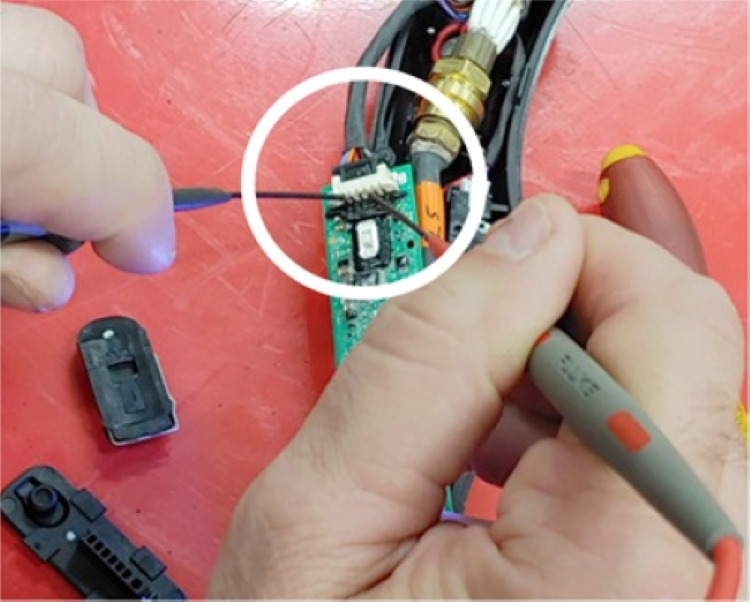
    The image shows the pins to test in the torch Printed Circuit Board.
  5. Is the voltage approximately 15 VDC? OptionDescription
    If yes... Continue with the next step.
    If no... Continue with step 9.
  6. Do a check for continuity between the torch and the plasma power supply:
    1. Do a check for continuity between pin 1 on the torch PCB (brown wire) and pin 7 at J19 on the power PCB.
    2. Do a check for continuity between pin 2 on the torch PCB (gray wire) and pin 8 at J19 on the power PCB.
    3. If there is continuity between the pins, continue with step 12.
    4. If there is not continuity between the pins, continue with the next step.
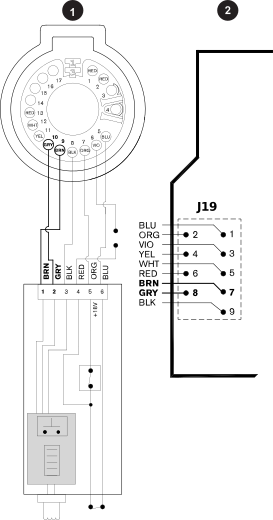
    The image is a wiring diagram that shows the pins to test between the torch and the plasma power supply.
    1 Pin 1 and pin 2 on torch PCB
    2 Pin 7 and pin 8 on power PCB
  7. Disconnect the torch from the plasma power supply.
  8. Do a check for continuity on the torch:
    1. Do a check for continuity between pin 1 on the torch PCB (brown wire) and pin 9 in the torch connector.
    2. Do a check for continuity between pin 2 on the torch PCB (gray wire) and pin 10 in the torch connector.
    3. If there is continuity between the pins, continue with step 10.
    4. If there is not continuity between the pins, replace the torch lead.
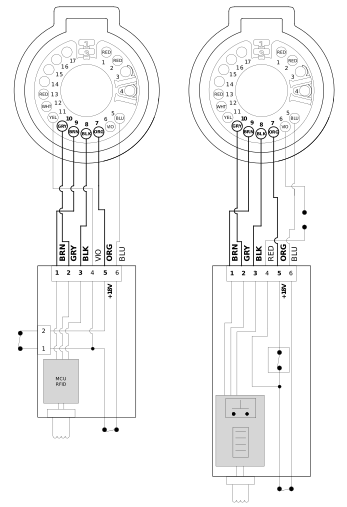
    The image is a wiring diagram that shows the torch lead connector pins to test.
  9. Disconnect the torch lead connector from the torch PCB.
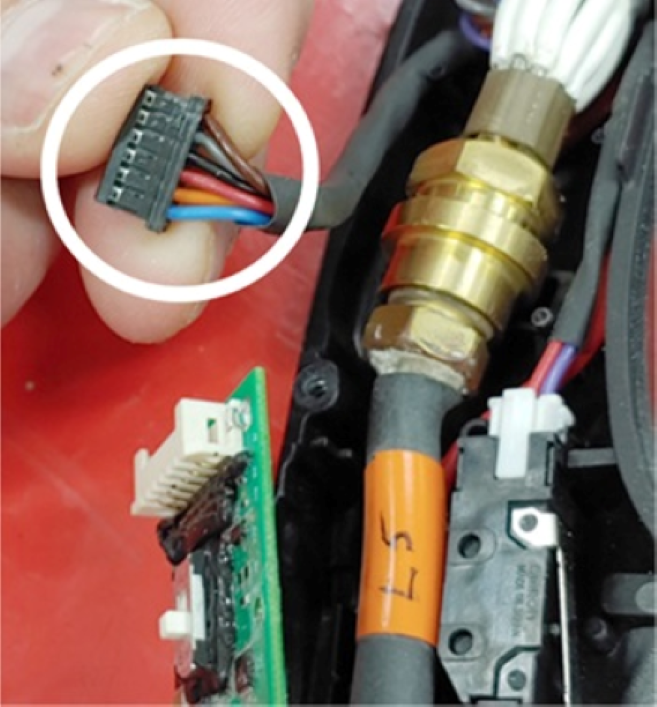
    The image shows a detailed view of the 6-pin connector with wire colors.
  10. Put the multimeter leads directly in the sockets for pin 3 and pin 5, and measure the voltage between pin 3 (black wire) and pin 5 (orange wire).
  11. Is the voltage approximately 15 VDC? OptionDescription
    If yes... Replace the power PCB.
    If no... Continue with the next step.
  12. Connect a different SmartSYNC torch to the plasma power supply that is known to operate correctly.
  13. Do you continue to get the 0-98-2 fault? OptionDescription
    If yes... Replace the power PCB.
    If no... There is a possible problem with the original torch. Continue with the next step.
  14. Connect the original SmartSYNC torch to the plasma power supply.
  15. Is the torch a hand torch or a mechanized torch? OptionDescription
    Hand torch

    Is there an LED on the torch PCB that is illuminated or flashing?

    • If yes, replace the torch PCB.
    • If no, replace the torch lead.
    Mechanized torch Replace the torch PCB. If the 0--98-2 fault does not go away, replace the torch lead.
  16. Disconnect the DSP PCB from the power PCB.

    Carefully remove the conformal coating from the pins, if necessary. Too much of this coating can prevent a good connection with the power PCB.

  17. If the problem continues, replace the DSP PCB.
  18. If the problem continues after a new DSP PCB is installed, replace the power PCB.