The Temperature fault Light Emitting Diode (LED) and the System Fault
LED flash alternately when the system receives a
Start signal from the torch at the same time that the power switch is set to ON
(I). This fault can prevent the torch from firing a plasma arc.
Fault codes and fault LEDs
| Fault code |
Fault LEDs |
Torch LED |
Description |
Stops the system from operating? |
| None |


Flash alternately
|

Yellow
|
The plasma power supply received a signal to start cutting at
the same time that the power switch was set to ON (I).
This condition is also referred to as a "stuck start." |
Yes. A quick restart is necessary. |
Corrective action: quick restart
-
Do you have a hand torch or a machine torch?
OptionDescription
| Hand torch: |
Release the torch trigger. |
| Machine torch: |
Set the Start signal to off. |
-
Do a quick restart of the plasma power supply.
-
If the Temperature fault LED and the System
Fault LED continue to flash alternately, do the
corrective action for hand torches or machine torches.
Corrective action for hand torches
-
If possible, do a test with a different hand torch that is known to
operate correctly.
-
Make sure that the torch is set to the green "ready to fire"
position.
-
Do the Temperature fault LED and
the System Fault LED continue to
flash alternately?
OptionDescription
| If yes... |
Continue with step 7. |
| If no... |
Continue with the next step. |
-
Disconnect the torch from the plasma power supply.
-
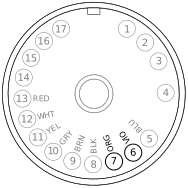
Make sure that the torch trigger is not being pulled, and measure the
resistance between pin 6 and pin 7 in the torch connector.
-
Is the resistance very low?
OptionDescription
| If yes... |
- Do a check for short circuits in the torch lead. Replace
the torch lead if the wires in it are
short-circuited.
- Do a check for short circuits in the trigger switch
assembly. Replace the trigger switch if it is
short-circuited.
|
| If no... |
Reconnect the torch to the plasma power supply, and continue
with the next step. |
-
Do the Temperature fault LED and
the System Fault LED continue to
flash alternately?
OptionDescription
| If yes... |
Replace the power Printed Circuit Board (PCB). |
| If no... |
Disconnect the torch from the plasma power supply, and
continue with the next step. |
-
Measure the resistance between pin 6 and pin 7 in the torch connector
while you are pulling the torch trigger.
-
Is the resistance very high?
OptionDescription
| If yes... |
- Do a check for open circuits in the torch lead. Replace
the torch lead if there are open circuits.
- Do a check of the trigger switch for open circuits.
Replace the trigger switch if there are open
circuits.
|
| If no... |
Continue with the next step. |
-
If the torch continues to not fire a plasma arc, and gas does not flow
from the torch, do a check for continuity between the torch and the
plasma power supply:
-
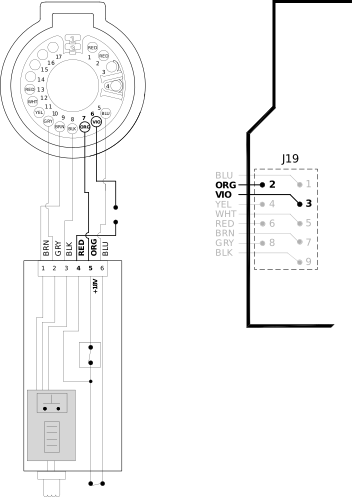
Put the torch on its side, and remove the left side of the
torch shell.
-
Do a check for continuity between pin 4 on the torch
PCB (red wire) and
pin 3 at J19 on the power PCB.
-
Do a check for continuity between pin 5 on the torch
PCB (orange wire) and
pin 2 at J19 on the power PCB.
-
If you do not have continuity between the pins, replace the
power PCB.
Corrective action for machine torches and the CNC
-
If possible, do a test with a different machine torch that is known to
operate correctly.
-
Make sure that the torch is set to the green "ready to fire"
position.
-
Do the Temperature fault LED and
the System Fault LED continue to
flash alternately?
OptionDescription
| If yes... |
Continue with the next step. The problem can be with the
Computer Numerical Control (CNC) or with the
machine interface cable. |
| If no... |
Continue with Corrective action for machine torches and the plasma power supply. There can be
a problem with the power PCB or the machine interface receptacle
in the plasma power supply. |
-
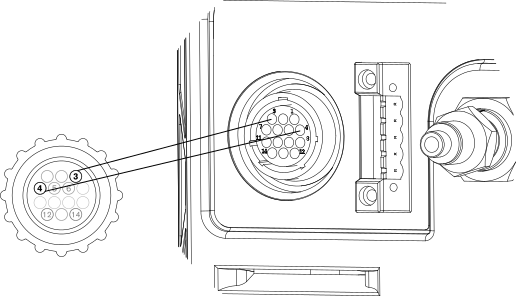
Disconnect the machine interface cable from the rear of the plasma
power supply.
This is the 14-pin cable that connects the plasma power supply to the
CNC.
-
Do a quick restart.
-
If the fault code goes away and the system operates correctly, restart
the CNC.
This can remove a start signal if there is one pending.
-
Connect the machine interface cable to the plasma power supply, and do
a quick restart.
-
If you continue to see the same fault condition, disconnect the machine
interface cable from the plasma power supply again.
-
Do a check for continuity on pin 3 and on pin 4 in the machine
interface cable connector.
-
Is there continuity on both pins?
-
Do a check for open circuits in the machine interface cable between pin
3 and the CNC and between pin 4
and the CNC.
-
Are the signals open?
OptionDescription
| If yes... |
There can be a problem with the CNC. Go to the last step. |
| If no... |
There can be a problem with the cable. Continue with the
next step. |
-
Disconnect the machine interface cable from the CNC.
-
Are there short-circuited wires in the cable?
OptionDescription
| If yes... |
Replace the machine interface cable. |
| If no... |
Continue with the next step. |
-
If there is not a problem with the machine interface cable, speak to a
support technician for the CNC to
identify possible problems that can prevent the torch from firing.
Corrective action for machine torches and the plasma power supply
-
Set
the power switch to OFF (O), and disconnect the power cord from the power
source.
-
Remove the plasma
power supply handle and cover.
-
Remove the
component barrier.
-
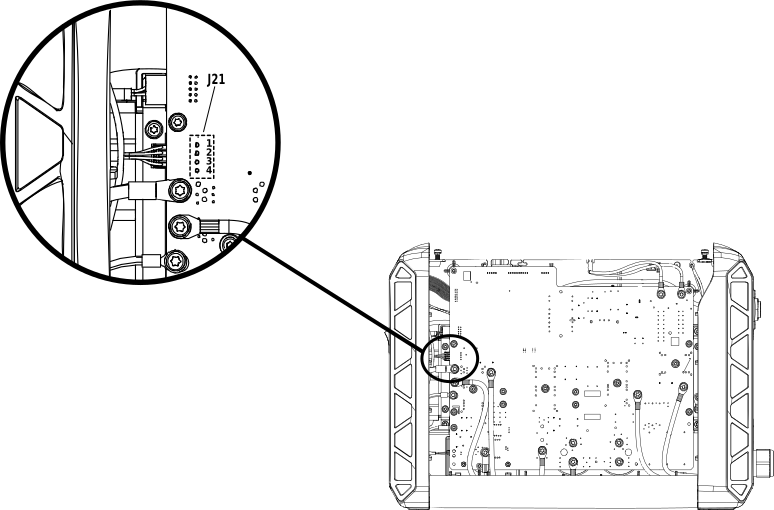
Do a check for continuity on pin 1 (red) and pin 2 (black).
-
Is there continuity on both pins?
OptionDescription
| If yes... |
There is possibly a problem with the wiring harness for the
machine interface receptacle. Replace the machine interface
receptacle with the voltage divider PCB assembly (223476). |
| If no... |
There is possibly a problem with the power PCB. Replace the power
PCB. |