
Troubleshooting for missing gas input faults
The Gas Pressure fault Light Emitting Diode (LED) flashes quickly when there is no gas supply input to the plasma power supply.
Fault codes and fault LEDs
| Fault code | Fault LEDs | Torch LED | Description | Stops the system from operating? |
|---|---|---|---|---|
| None |

Flashes quickly |

Yellow |
There is no gas supply input. | Yes. The fault code goes away when you connect the gas supply to the plasma power supply unless there is a blockage in the gas line. |
Corrective action for the input gas supply
- Make sure that the input gas supply is connected correctly to the plasma power supply.
- Examine the input gas supply line, and make sure that there are no gas leaks, loose connections, or blockages.
- Do a quick restart.
Corrective action for the solenoid valve and power PCB
-
With the gas disconnected and the plasma power supply ON, can you hear
the solenoid valve make a click?
Option Description If yes... - Examine the gas hoses that connect to the solenoid valve.
- Replace the hoses if they have kinks or other damage.
- Reconnect the input gas supply to the plasma power supply.
- Set the power switch to ON (I).
- Fire the torch.
If no... Continue with the next step. 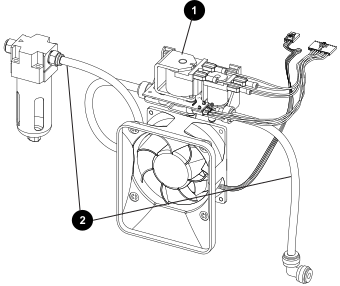
1 Solenoid valve 2 Gas hoses -
Is the voltage approximately 48 VDC?
Option Description If yes... Continue with the next step. If no... Continue with step 11. 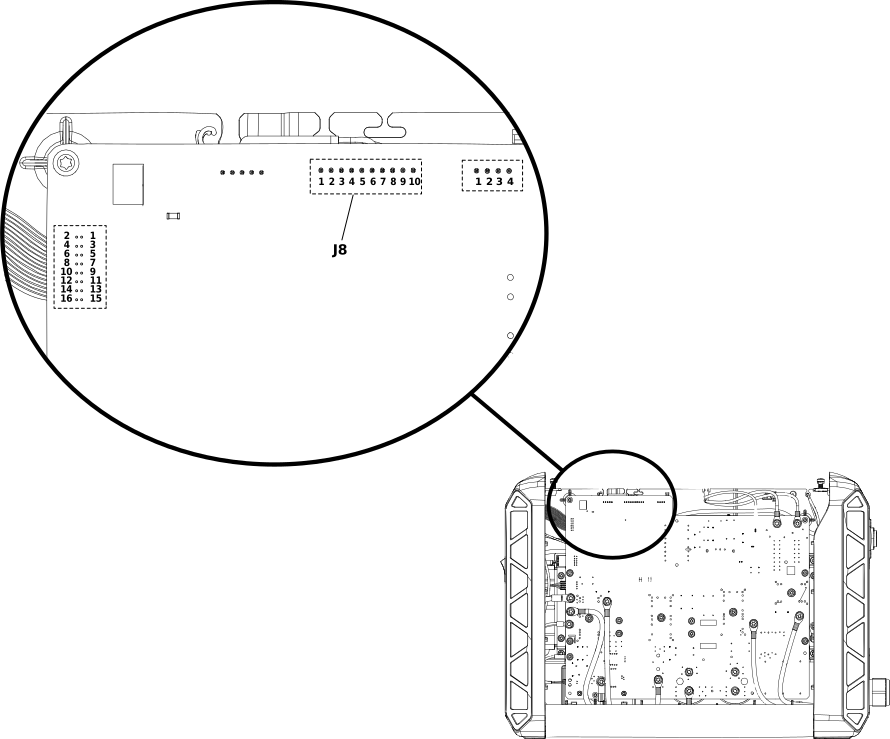
-
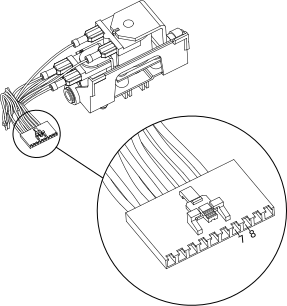
Do a resistance check to make sure that the solenoid valve is
defective:
-
If the resistance is less than 44 ohms (Ω), ±5 ohms (Ω),
replace the solenoid valve.
-
If the resistance is less than 44 ohms (Ω), ±5 ohms (Ω),
replace the solenoid valve.