
Use the XPR web interface and no router to connect
You must connect to the plasma power supply through the Internet Protocol (IP) network before you can configure the Ethernet Local Area Network (LAN) settings for your cutting system. This information prepares you to use an Ethernet LAN, serial RS-422, or EtherCAT® communication method to connect to the plasma power supply.
If you do not have a router or if your router does not have Dynamic Host Configuration Protocol (DHCP) capabilities, you must configure the Ethernet LAN settings after you connect to the plasma power supply. The default Ethernet LAN settings will not work with a non DHCP router. If you do not have a router or if your router does not have DHCP capabilities, use the XPR® web interface through Ethernet LAN to connect to the plasma power supply and configure Ethernet LAN settings.
You must have a computer-based device with a screen and a web browser that has support for the latest web standards.
-
Navigate to http://169.254.0.100.
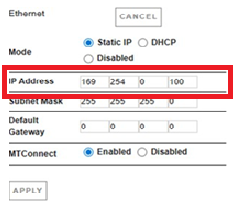
- The plasma power supply is now connected.
- The default Ethernet LAN settings must be configured.
- Do the procedure in Configure Ethernet LAN settings if you have an Ethernet LAN connection or wireless connection.
- Do the procedure in Serial RS-422 and EtherCAT Commands from the CNC Communication Protocol for the XPR Cutting Systems (10085793) if you have a serial RS-422 or EtherCAT connection or wireless connection.