
Remove the rear panel

To separate and remove the rear panel from the plasma power supply, complete this procedure.

  1. Loosen the rear panel.
  2. Push-to-disconnect the gas supply hose from the air filter assembly.
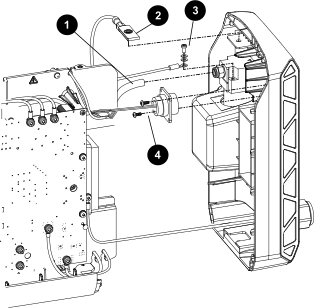
    Image of the rear panel internal components.
    1 Gas supply hose
    2 Ground clip
    3 Ground wire
    4 Machine interface port screws
  3. Disconnect the ground clip from the rear panel tab.
  4. Disconnect the ground wire from the air filter assembly.
  5. Unplug the serial cable from the RS-485 Printed Circuit Board (PCB) if installed (not shown).
  6. Remove the 2 screws that attach the machine interface port to the rear panel if installed.

    Remove the connector from the panel.

  7. Remove the power cord ground wire from the heatsink.
    Figure 1. Power cord connection points
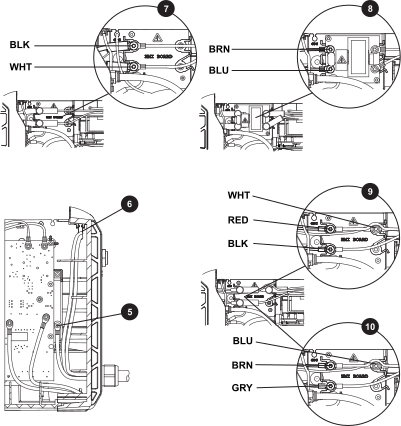
    5 Power cord ground wire to heatsink
    6 Power cord pass-through
    7 CSA 1-phase
    8 CE/CCC 1-phase
    9 CSA 3-phase
    10 CE/CCC 3-phase
  8. Remove the red insulating covers, and unscrew the power cord connection points.

    Pull the wires through the center panel grommet.

    1. Disconnect 2 wires for the 1-phase models:
      • CSA models: wires are black (BLK) and white (WHT).
      • CE/CCC models: wires are brown (BRN) and blue (BLU).
    2. Disconnect 3 wires for the 3-phase models:
      • CSA models: wires are white (WHT), red (RED), and black (BLK).
      • CE/CCC models: wires are blue (BLU), brown (BRN), and gray (GRY).
  9. Separate the rear panel assembly from the unit.