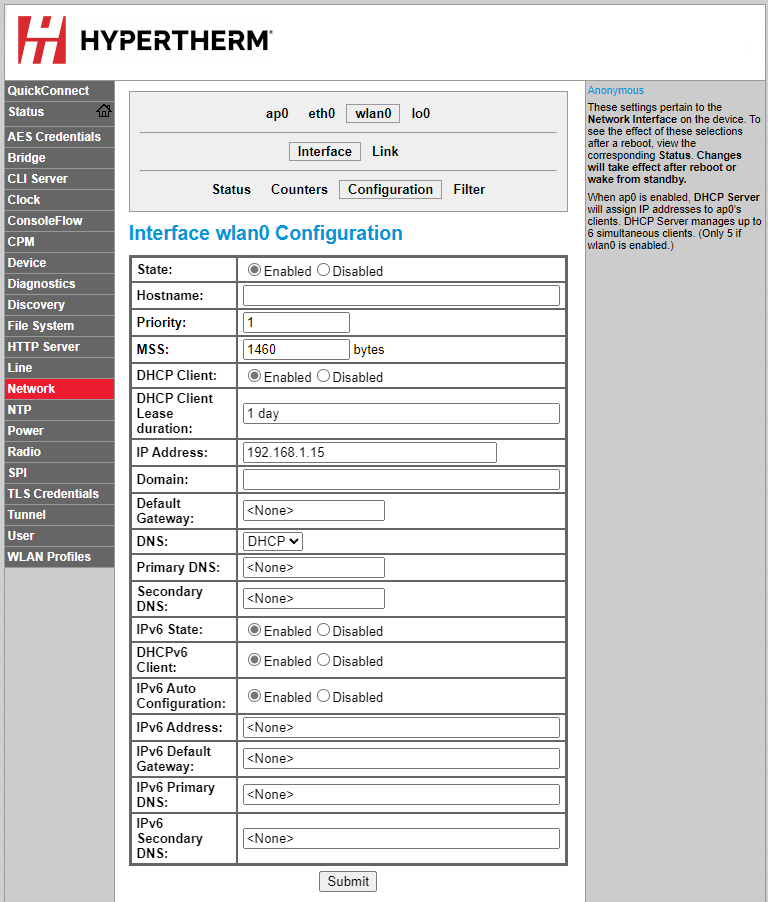
Change the network settings

You can change the network settings on the Device Setup screen.

  1. On the Device Setup screen, choose Network > wlan0 > Interface > Configuration.
    Choose Network, wlan0, Interface, and Configuration on the Device Setup screen.
  2. In the Interface wlan0 Configurations fields, change the settings.
  3. Make sure that all of the settings are correct, then choose Submit to save and apply them.
  4. Remove the power from the cutting system.
  5. Supply power to the cutting system.

The change goes into effect after you remove and then supply power to the cutting system.