Troubleshooting for solenoid valve pressure sensor faults (2-11-n)

A 2-11-0 or 2-11-1 fault code identifies a possible problem with the gas pressure sensor in the solenoid valve.

Fault codes and fault LEDs

Fault code Fault LEDs Torch LED Description Stops the system from operating?
2-11-0 The image shows the System Fault Light Emitting Diode.

ON

The image shows the torch Light Emitting Diode illuminated red.

Red

The pressure sensor is open. Yes
2-11-1 The pressure sensor short-circuited.

Corrective action for electrical interference and pinched wires (2-11-0 and 2-11-1)

  1. Make sure that the torch lead is fully connected in the quick-disconnect receptacle.
  2. Move the plasma power supply to another location, and see if the problem continues.
  3. Set the power switch to OFF (O), and disconnect the power cord from the power source.
  4. Remove the plasma power supply handle and cover.
  5. Remove the component barrier.
  6. Examine the rear of the quick-disconnect receptacle to see if the wires from the receptacle are pinched, twisted, or have other damage.
  7. Replace the receptacle if necessary.

Corrective action for the power input and solenoid valve coils (2-11-0 and 2-11-1)

  1. Disconnect the solenoid valve from J8 on the power Printed Circuit Board (PCB).
  2. Reconnect the power cord.
  3. Set the power switch to ON (I).
  4. Measure the voltage between pin 1 and pin 4 at J8 on the power PCB.
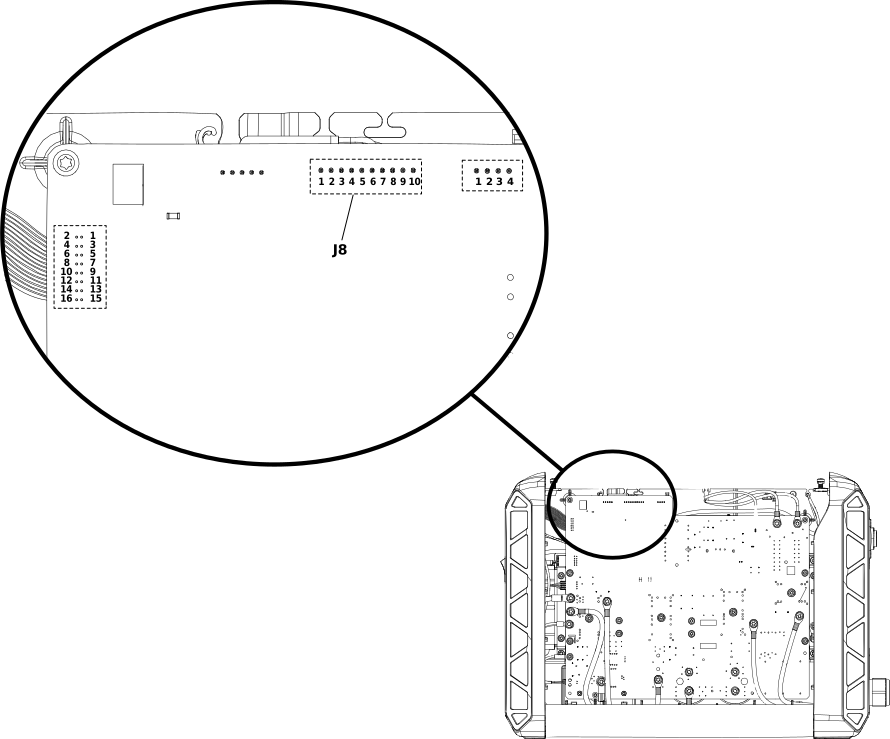
    The image shows the J8 pin location on the power Printed Circuit Board.
  5. Is the voltage approximately 5 VDC? OptionDescription
    If yes... Continue with the next step.
    If no... Replace the power PCB. Refer to Remove the power PCB.
  6. Measure the resistance on the solenoid valve J8 connector:
    1. Make sure that the resistance between pin 5 and pin 6 is approximately 22 Ω (±3 Ω).
    2. Make sure that the resistance between pin 7 and pin 8 is approximately 44 Ω (±5 Ω).
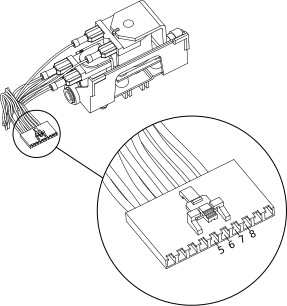
    The image shows a detailed view of the pins on the solenoid valve connection cable.
  7. Are the resistance values correct? OptionDescription
    If yes... Continue with Corrective action for the solenoid valve sensor and power sensor (2-11-0 and 2-11-1).
    If no... Replace the solenoid valve. Refer to Remove the solenoid valve.

Corrective action for the solenoid valve sensor and power PCB sensor (2-11-0 and 2-11-1)

  1. Set the power switch to OFF (O).
  2. Disconnect the solenoid valve from J8 on the power PCB.
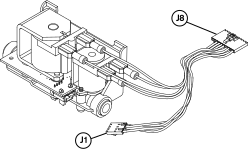
    The image shows the connectors attached to the solenoid valve.
  3. Disconnect the J1 connector from the solenoid valve PCB.
  4. Do the pins on the connectors or on the solenoid valve PCB have damage? OptionDescription
    If yes... Replace the solenoid valve. Refer to Remove the solenoid valve.
    If no... Continue with the next step.
  5. Reconnect the solenoid valve to J8 on the power PCB.
  6. Reconnect J1 to the solenoid valve PCB.
  7. Disconnect the gas supply.
  8. Set the power switch set to ON (I).
  9. Measure the voltage between pin 1 and pin 2 on J8.
  10. Is the voltage approximately 0.18 V — 0.22 V? OptionDescription
    If yes... Replace the power PCB. Refer to Remove the power PCB.
    If no... Replace the solenoid valve. Refer to Remove the solenoid valve.