
Connect the pilot-arc and coolant assembly for Core or CorePlus

Use this information to connect the pilot-arc cable, coolant-return hose, and coolant-supply hose assembly to the Core or CorePlus gas connect console and the TorchConnect console.

Figure 1. Pilot-arc and coolant assembly
This image shows the pilot-arc and coolant assembly that goes between the gas connect console and TorchConnect console.
1 Pilot-arc cable, yellow
2 Coolant-return hose, red bands
3 Coolant-supply hose, green bands
4 Assembly coupler
5 To the gas connect console
6 To the TorchConnect console

The images that follow show an example gas connect console. Your gas connect console could look different.

  1. Connect the pilot-arc and coolant assembly to the gas connect console:
    1. Put the pilot-arc and coolant assembly through the console collar on the gas connect console.
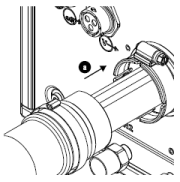
      This image shows where to put the pilot-arc and coolant assembly through the console collar on the gas connect console.
    2. For ease of access, remove the top insulation panel by moving it horizontally before you connect the pilot-arc cable.

      Not all gas connect consoles have a top insulation panel.

    3. Connect the pilot-arc cable.
    4. Connect the coolant-return hose with the red bands to the coolant-return fitting with the red band.
    5. Connect the coolant-supply hose with the green bands to the coolant-supply fitting with the green band.
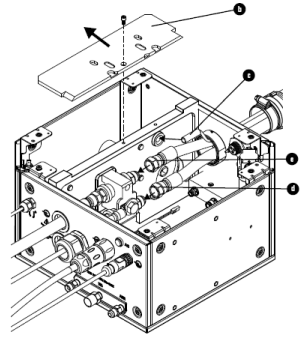
      This image shows removal of the top insulation panel and the connections for the pilot-arc and coolant assembly in the gas connect console.
    6. Remove the hose clamp from the pilot-arc and coolant assembly, put it in the groove on the console collar.
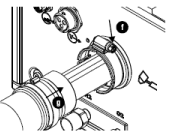
      This image shows the location of the hose clamp and the direction to move the hose clamp and assembly coupler to the console collar.
    7. Put the assembly coupler on the console collar and tighten the hose clamp.
    8. If you removed the top insulation panel, install it again.
  2. Connect the pilot-arc and coolant assembly to the TorchConnect console:
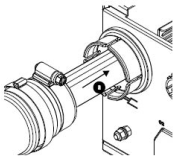
    This image shows where to put the pilot-arc and coolant assembly through the console collar on the TorchConnect console.
    1. Put the pilot-arc and coolant assembly through console collar.
    2. Connect the coolant-return hose with red bands to the coolant-return fitting with the red band.
    3. Connect the coolant-supply hose with green bands to the coolant-supply fitting with the green band.
    4. Connect the pilot-arc cable in the TorchConnect console.
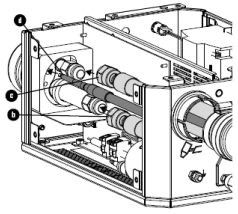
      This image shows the connectors for the pilot-arc and coolant assembly in the TorchConnect
    5. Remove the hose clamp from the pilot-arc and coolant assembly, put it in the groove on the console collar.
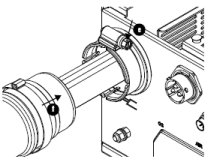
      This image shows the location of the hose clamp and the direction to move the hose clamp and coupler on the console collar.
    6. Put the coupler on the console collar and tighten the clamp.
  3. Install the external panels on the gas connect console and TorchConnect console.
