
Connect the plasma power supply
Use this information to connect the hoses, cables, and leads to the plasma power supply.
- Put the plasma power supply in position
- Ground the system components
- Prepare the hoses, cables, and leads
- Refer to the label that shows the symbols and connectors on the rear of the plasma power supply.
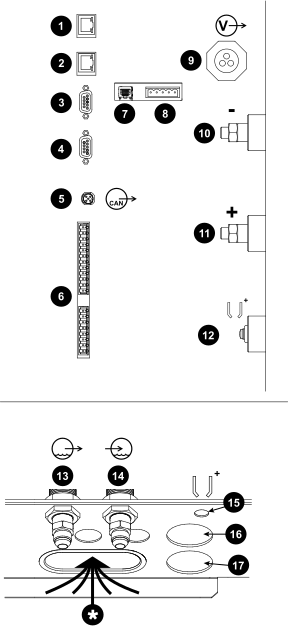
| 1 | EtherCAT®-out connection | |
|---|---|---|
| 2 | EtherCAT-in connection | |
| 3 | RS-422 connection | |
| 4 | - | RS-422 connection |
| 5 |

|
Controller Area Network (CAN) connection |
| 6 | Computer Numerical Control (CNC) discrete | |
| 7 | Ethernet Local Area Network (LAN) port | |
| 8 | Expansion Printed Circuit Board (PCB) connectors: Necessary for redundant remote on-off feature, alternate 24 VDC power input, and analog estimated arc voltage output. | |
| 9 |

|
Power connection |
| 10 | - | Negative connection |
| 11 | + | Work connection |
| 12 |

|
Pilot arc connection |
| 13 |

|
Coolant supply (green) |
| 14 |

|
Coolant return (red) |
| 15 |
|
Pilot arc routing hole |
| 16 | - | Negative connection routing hole |
| 17 | + | Positive connection routing hole |
| * | Use this routing hole for the following cords, cables, and leads: power, RS-422, CNC discrete, EtherCAT-in, EtherCAT-out, Ethernet LAN cable with expansion PCB cable, and CAN. |
-
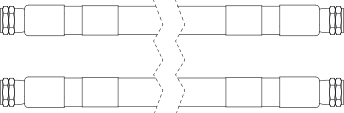
Connect the coolant-hose assembly to the plasma power supply from the gas
connect console.
Tighten each nut until snug.
 Note:
Note:The coolant-hose assembly includes one coolant-supply hose with green bands and one coolant-return hose with red bands.
Refer to Coolant-hose assemblies (plasma power supply to gas connect console) for lengths and part numbers.
-
Connect the 120 VAC power cable to the plasma power supply from the gas connect
console.
Make sure this connection is tight.
 Note:
Note:At least one 120 VAC power cable is necessary for all cutting systems. Some cutting systems use one 120 VAC power cable and one 220 VAC power cable.
Refer to Power cable, 120 VAC for lengths and part numbers.
-
Connect the CAN cable to the plasma
power supply from the gas connect console.
Make sure this connection is tight.
 Note:
Note:Refer to CAN cables for lengths and part numbers.
-
Connect the pilot-arc cable to the plasma power supply from the gas connect
console.
Tighten the screw until snug.
 Note:
Note:Refer to Pilot-arc cables with strain relief for lengths and part numbers.
-
Connect the negative cable to the plasma power supply from the gas connect
console.
Tighten the nut until snug.
- Remove the inner nut from the strain relief assembly on the negative cable.
- Put the cable and strain relief nut for the negative cable through the hole in the sheet metal panel.
- Put the inner nut from the strain relief assembly over the end of the negative cable.
- Tighten the inner nut to the strain relief nut for the negative cable.
Figure 2. Negative cable with strain relief 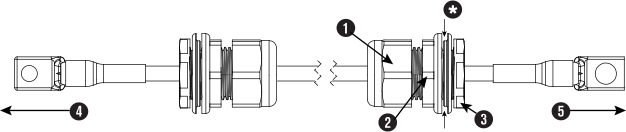
1 Outer nut 2 Strain relief nut 3 Inner nut 4 To plasma power supply 5 To gas connect console * The sheet metal of the internal console panel intersects here. Note:Refer to Negative cables with strain relief for lengths and part numbers.
-
Connect the work cable to the plasma power supply from the cutting table.
Tighten the nut until snug.
Figure 3. Work cable with strain relief 
1 This end goes to the plasma power supply. 2 This end goes to the cutting table. Note:At least one work cable is necessary for all cutting systems. Some cutting systems use two work cables.
Refer to Work cables for lengths and part numbers.
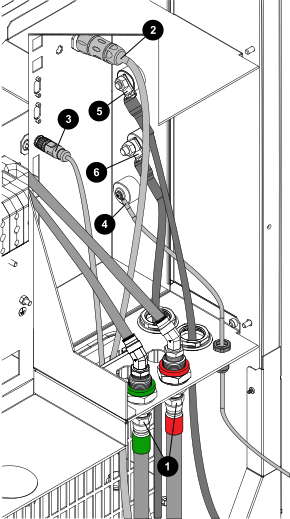
| 1 | Coolant supply, green and coolant return, red |
|---|---|
| 2 | Power cable to the gas connect console |
| 3 | CAN cable to the gas connect console |
| 4 | Pilot-arc cable to the gas connect console |
| 5 | Negative cable to the gas connect console |
| 6 | Work cable to the cutting table |