
Troubleshooting for process-gas inlet pressure faults in the TorchConnect console for OptiMix systems
Diagnostic codes 702, 705, 769, and 770
The 702, 705, 769, and 770 diagnostic codes identify a problem with the process-gas inlet pressure. Process-gas inlet pressure has an effect on cut quality, cut speed, and consumable life.
The nitrogen (N2) and Argon (Ar) gas regulators inside the OptiMix™ gas connect console are set at Hypertherm® before the regulators are installed in the gas connect console. The regulators are set in a dynamic condition, when gas is flowing, with 7.9 bar – 9.3 bar (115 psi – 135 psi) on the inlet and 6.9 bar (100 psi) on the outlet. A downstream 1.6 mm (0.063 inch) orifice is part of both regulator setting configurations.
- The N2 shield inlet (P4) pressure is more than 7.5 bar (110 psi) or less than 6.2 bar (90 psi).
- The Ar shield inlet (P4) pressure is more than 7.5 bar (110 psi) or less than 6.2 bar (90 psi).
Symptoms
| Code | Symptoms | XPR® models | XPR action | Code cancels with... |
|---|---|---|---|---|
| 702 | For a minimum of 200 milliseconds, the nitrogen (N2) inlet pressure (P4) in the TorchConnect™ console is less than 5.52 bar (80 psi) or more than 9.31 bar (135 psi). | All models | None |
|
| 705 | For a minimum of 200 milliseconds, the argon (Ar) inlet pressure (P4) in the TorchConnect console is less than 5.52 bar (80 psi) or more than 9.31 bar (135 psi). | |||
| 769 | Line B Argon inlet pressure (P1) is less than 5.52 bar (80 psi) or more than 9.31 bar (135 psi). | |||
| 770 | Line B N2 inlet pressure (P1) is less than 5.52 bar (80 psi) or more than 9.31 bar (135 psi). |
| Warning | |
|---|---|
  | |
| Warning | |
|---|---|
| |
Corrective action to adjust the N2 regulator
-
Pull up the N2 regulator knob until the orange indicator is
visible.
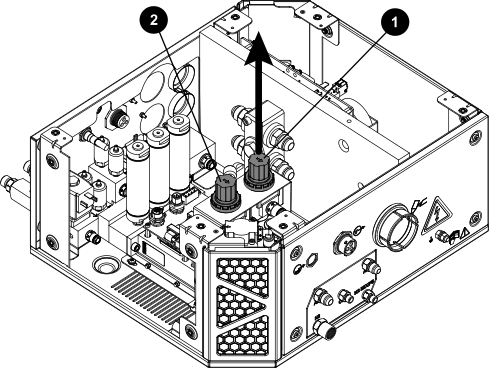
1 Nitrogen (N2) regulator knob 2 Argon (Ar) regulator knob